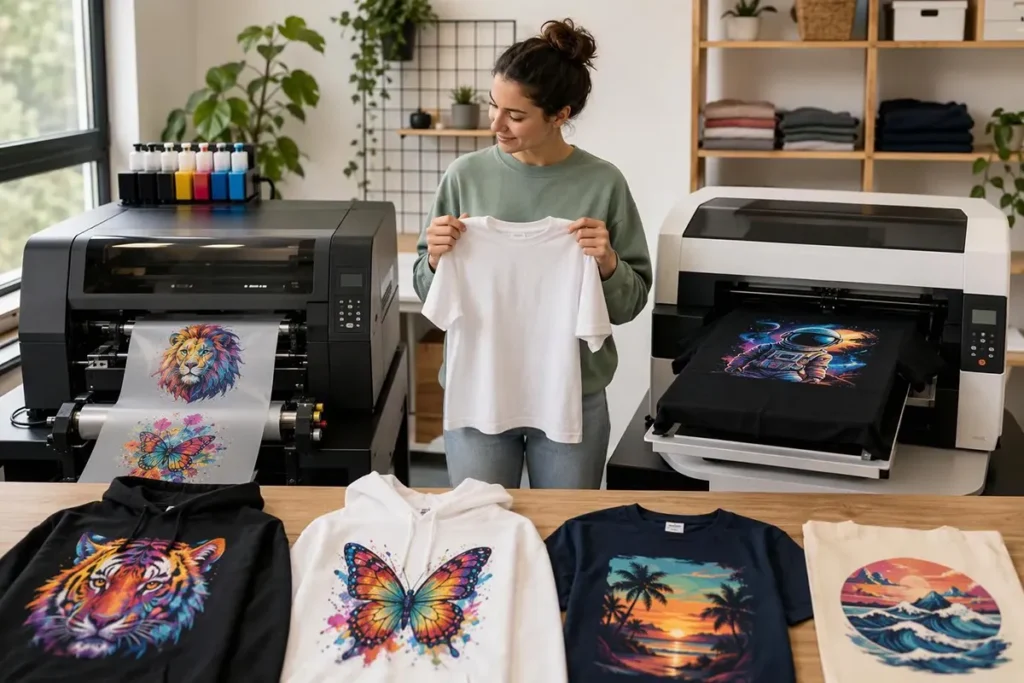
The short answer: a white toner printer suits shops that print in small, irregular batches and want to decorate hard goods as well as garments. A DTF printer suits shops that print apparel regularly and want a soft, stretchy transfer and room to scale. The deciding factors are less about print quality on a sample sheet and more about order rhythm, product mix, and who does the hands-on work.
Both methods print a design onto a carrier and then heat-press it onto the product. Beyond that, the white toner vs DTF comparison splits on almost every practical point: consumables, steps, upkeep, feel, and how cost behaves as volume grows.
We manufacture DTF printers, not white toner equipment, so keep that in mind as you read. The goal here is to help you decide which process fits your work, including the cases where DTF is the wrong choice.
How Each Process Works
White Toner Transfer Printing
A white toner printer is a laser or LED printer that uses dry toner instead of liquid ink. It builds the image on a drum and bonds the toner to transfer media with a heated fuser. White toner provides the underbase that keeps colors visible on dark products.
Station layouts vary by model. Some printers run cyan, magenta, yellow, and white, with black built from the three colors. Others can also run black or switch modes; the UNINET iColor 560 comparison page, for example, describes a black toner and drum kit for switching to CMYK when white isn’t needed. Check the exact configuration of any model you’re quoted.
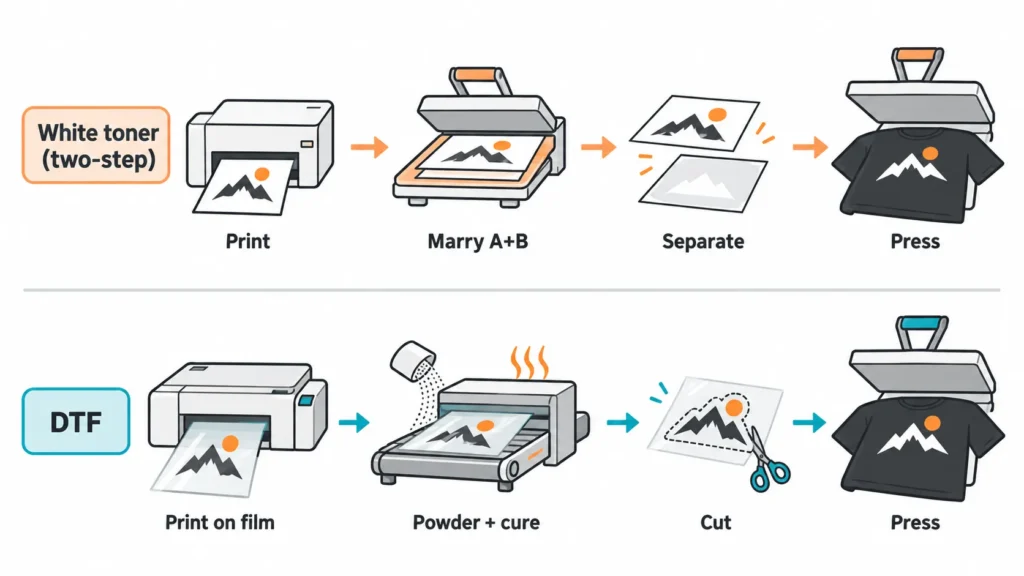
For dark garments, most work uses a two-step media set:
- Print the mirrored design onto the transfer sheet (often called the A sheet).
- Heat-press the A sheet against an adhesive sheet (the B sheet). This step is called marrying; the adhesive bonds to the toner areas.
- Separate the two sheets as the media instructions specify.
- Press the A sheet onto the garment, then remove the carrier according to the media’s peel instructions.
Some media runs as one-step paper, mainly for certain light garments and hard surfaces. The process, temperatures, and peel method depend on the specific paper, so the steps above are a general outline rather than one universal recipe.
DTF Printing
A DTF printer is an inkjet printer that prints CMYK plus white water-based pigment ink onto PET film. It prints the colors first and lays white behind them. While the ink is still wet, hot-melt adhesive powder is applied, the excess is shaken off, and the powder is cured.
The cured transfer is then pressed onto the garment and peeled as the film requires. Many commercial printers pair the printer with an inline powder shaker and dryer, so powdering and curing happen as the film advances. Desktop setups may handle those steps by hand. For a closer look at the steps, see our guide on how to heat press DTF transfers.
Note that textile DTF and UV DTF are different processes. UV DTF makes stickers for hard surfaces; the DTF vs. UV DTF comparison explains the difference.
White Toner vs DTF at a Glance
| Factor | White toner printer | DTF printer | What it means for the decision |
|---|---|---|---|
| Colorant | Dry toner, fused to media | Liquid pigment ink plus hot-melt powder | Determines the upkeep and the consumables you stock |
| Media format | Cut sheets, size set by the model | Film sheets or rolls, depending on the printer | Rolls support gang sheets and longer unattended runs |
| Dark-garment workflow | Usually two-step A/B media | Print, powder, cure, press | Shifts where the labor sits |
| Product range | Garments plus hard goods with matching papers | Textiles; hard goods belong to UV DTF | Matters if mugs, signs, or wood items are part of the mix |
| Idle tolerance | No liquid ink to settle or dry in nozzles | White ink needs regular handling | Matters most for shops that print only a few days a week |
| Scaling | Limited by sheet size and press time | Roll-fed printers and inline curing add capacity | Matters if apparel volume is expected to grow |
The rest of this DTF vs white toner guide explains which of these differences actually changes the outcome for a shop.
Finished Results: Feel, Stretch, and Color
On garments, hand feel is where buyers notice the biggest difference. The two processes put different materials on the fabric, so solid areas can feel and flex differently. Many white toner users reduce stiffness in large solid areas by rasterizing the artwork, which breaks solid fills into halftone patterns.
That tells you a technique exists. It doesn’t tell you which process will feel better on your blank with your artwork. Coverage, the specific media or film, the powder grade, and the press settings all change the result.
Durability works the same way. Published wash counts for both methods vary widely and rarely state the garment, artwork, wash conditions, or what counted as a failure. The reliable approach is to test both processes on the same design and blank, which is covered in the sample section below.
Color and detail also depend on more than the printer type. Fine text, gradients, and small white details reveal differences quickly, so include them in any sample. On the finished garment, look for even white coverage, colors that line up with the white layer, and no stray white edges. This guide to the white ink layer in DTF transfers explains what that layer does on dark fabric.
Where the Labor Goes in Each Workflow
Print speed is rarely the bottleneck. The hands-on steps after printing usually decide how many finished pieces leave the shop. Laser printers output sheets quickly, but a two-step white toner job then needs the heat press twice: once to marry the sheets and again to apply the transfer to the garment.
That matters because both steps compete for the same press. A one-press shop doing a large two-step order may find the press, rather than the printer, sets the pace. A second press, or a different media type, changes that math.
DTF moves the labor earlier. On a printer with an inline shaker, the powdering and curing happen without someone handling each sheet. The operator mostly cuts transfers and presses garments. On a desktop setup with manual powdering, the extra handling comes back.
| Step | White toner, two-step | DTF with inline shaker | DTF with manual powdering |
|---|---|---|---|
| Artwork prep and mirroring | Yes | Yes | Yes |
| Sheet by sheet | Continuous on film | Sheet or short roll | |
| Adhesive step | Marry A and B sheets in the press | Automatic powder and cure | Hand powder, shake, and cure |
| Separate or trim | Separate sheets, trim | Cut transfers | Cut transfers |
| Press onto garment | Yes | Yes | Yes |
| Peel and finish | Per media instructions | Per film instructions | Per film instructions |

To compare the two fairly, map the steps for an order you actually take. A realistic example is a dozen left-chest prints plus a few full-front prints on dark tees. Count how many times someone touches each piece and how many press cycles it needs. That count usually predicts daily output better than any pages-per-minute figure.
Maintenance and Idle Time
This is where white toner has a real advantage for intermittent shops. Dry toner has no liquid ink path, so there are no nozzles to dry out and no white ink to settle between jobs. A printer that sits for several days needs far less attention before the next order.
That doesn’t make it maintenance-free. Toner cartridges, drum or imaging units, the fuser, and waste toner are consumables or service parts with lives set by each model. Budget for them using the manufacturer’s schedule, not a general claim.
DTF white ink needs regular handling because its pigment settles. Epson’s SureColor F1070 user’s guide, for its DTG/DTF platform, calls for shaking white ink packs every 24 hours. It also notes that maintenance consumes white ink even when printing only with color. Other printers handle this differently, with stirring, circulation, and capping, but the need for care remains.
| Printing pattern | White toner printer | DTF printer |
|---|---|---|
| Daily production | Routine consumable changes | Daily checks fit naturally into the shift |
| A few days a week | Little preparation after short gaps | Model-approved idle routine between sessions |
| Occasional orders with long gaps | Low idle burden | Needs someone responsible for upkeep, or a long-term storage procedure |
For DTF, the right routine depends on the printer. Our DTF printer maintenance guide covers daily care, and the downtime and restart guide explains why an overnight pause and a two-week break need different steps. If nobody can own that care between orders, white toner or buying finished transfers may fit better for now.
Cost: Compare the Cost per Accepted Transfer
Sheet price comparisons mislead, because the two processes use different media sizes and different consumables. A per-sheet figure for a letter-size toner transfer and a per-sheet figure for a larger DTF film area don’t measure the same thing. Neither includes labor, rejects, or the ink used to keep a printer ready.
A more useful number is the cost per accepted transfer, calculated over a real batch:
Cost per accepted transfer = (media + toner or ink + adhesive sheets or powder + upkeep consumables + labor time × hourly rate) ÷ transfers that pass inspection
| Cost item | White toner printer | DTF printer |
|---|---|---|
| Print media | Transfer sheets | PET film |
| Colorant | Toner, plus drum or imaging unit wear | Ink, including white |
| Adhesive | B sheets, or adhesive built into one-step media | Hot-melt powder |
| Upkeep | Fuser and other model-specific service parts | Cleaning fluid, ink used in maintenance, filters, caps, wipers |
| Labor | Marrying, separating, trimming, pressing | Cutting and pressing; powdering if manual |
| Rejects | Misaligned marrying, failed transfers | Test prints, start-up waste, failed transfers |
Run the formula for the same design at the size you actually sell. If one method prints the design on a smaller area, the comparison stays fair because you’re dividing by finished pieces, not sheets.
Equipment cost needs the same care. A DTF quote may or may not include the shaker, dryer, heat press, ventilation, and RIP software. A white toner package may or may not include the RIP, media starter kit, and press. List every item needed to produce a finished garment, and don’t count an integrated curing unit twice. Our DTF printer buying guide covers the technical checks for a DTF configuration.
Which One Fits Your Business?
The white toner printer vs DTF printer choice comes down to product mix, order rhythm, and growth plans. These patterns point clearly one way or the other.
Choose a white toner printer when:
- Orders arrive in small, irregular batches with gaps between printing days.
- Hard goods such as wood, signs, or other rigid items are part of the product mix, using the matching media.
- Desk space is limited and nobody is available to manage daily ink care.
- Volume is modest enough that the extra pressing steps don’t create a bottleneck.
Choose a DTF printer when:
- Apparel is the core product and printing happens most working days.
- Hand feel and stretch on garments matter to customers.
- Gang sheets, larger designs, or rolls of transfers are part of the work.
- Volume is expected to grow, or selling transfers to other decorators is part of the plan.
Some shops run both: white toner for hard goods and quick one-offs, DTF for apparel volume. And if orders are too occasional to justify either printer, outsourcing makes sense. Our comparison of outsourcing DTF transfers vs. buying a printer walks through that decision.
Run a Side-by-Side Sample Before You Buy
I recommend testing both processes with your own file and your own blank, not the seller’s demo art. Vendor samples tend to show bold graphics that hide differences in fine detail and feel.
- Build one test file. Include a large solid area, fine white text, a gradient, and small detail. Print it at the size you actually sell.
- Use your real blanks. Test on the dark garment you sell most, and on a poly blend if you sell those too.
- Record the work. Note every step, the minutes from first print to last finished garment, the press cycles, and any rejects.
- Check feel and stretch. Handle both garments side by side and stretch the printed area gently.
- Wash with fixed rules. Choose the wash and dry settings from the garment’s care label. Decide in advance what counts as a failure, such as cracking, edge lift, or fading, then compare after the same number of cycles.

This won’t prove long-term reliability, but it does show how each method performs on your work. Then put the numbers you recorded into the cost formula above.
Frequently Asked Questions
Some sellers call it “powderless DTF” because it also prints onto a carrier. The process is different, though: it uses dry toner and adhesive sheets, while DTF uses liquid ink, PET film, and hot-melt powder.
Neither process wins in every case. Durability depends on the media or film, the garment, the artwork, the press settings, and washing conditions. Test both on the same garment with fixed wash rules.
Yes, with media designed for the specific surface. Textile DTF is made for fabrics; for hard surfaces, compare white toner with UV DTF instead.
They avoid liquid-ink nozzle care, but toner, drum or imaging units, and the fuser still need replacing on the model’s schedule. They require less hands-on care, not zero care.
It takes more planning. White ink needs regular handling, so follow the printer’s approved idle procedure and assign someone to it. Without that, intermittent use can cause problems.
Choosing the Right Fit
Start with three questions: how often you print, what products you decorate, and who will handle the steps after printing. Shops with irregular orders and a mixed product range often find white toner fits. Shops built around regular apparel orders usually get more from DTF.
If DTF looks like the right fit, send us your usual design sizes, garment types, weekly order volume, and the days you print. We’ll recommend a DTF printer configuration with matched inks, film, and powder and prepare a quote for that setup.