
XINFLYING TECHNICAL SUPPORT
Digital Printing Machine Support
Get support for DTF, UV, DTG, and sublimation setup, maintenance, and troubleshooting.
How We Support Your Business
Clear, practical support for the steps that matter before, during, and after production.
Installation Guidance
Remote guidance for machine setup, software installation, and initial printing preparation.
Daily Operation & Maintenance
Practical routines to help maintain print quality and reduce avoidable downtime.
Troubleshooting Assistance
Support for print quality, ink circulation, media handling, heating, software, and machine operation issues.
Parts & Service Coordination
Help identifying replacement parts and coordinating the appropriate technical solution.
Select Your Machine Type
Choose your equipment type and tell us the issue. The form below will help route your request.
DTF Printer Support
Assistance with printing, white ink circulation, powder shaking, curing, film feeding, and RIP setup.
UV Printer Support
Assistance with ink system setup, print alignment, media handling, UV curing, and color output.
DTG Printer Support
Assistance with garment setup, pretreatment workflow, printing, curing, and routine maintenance.
Dye Sublimation Support
Assistance with paper loading, color workflow, transfer settings, and production consistency.
TECHNICAL RESOURCES
Maintenance & Troubleshooting Guides
Browse practical guides for daily care, key component servicing and common production issues. Please confirm your equipment type and machine model before following any procedure.Select a guide that matches your equipment type and machine model.
DTF PRINTER · DAILY MAINTENANCE
DTF Printer Maintenance
Routine maintenance guidance for XINFLYING DTF printer systems, covering daily checks, cleaning procedures and key component care to help maintain stable production.
Compatible with: DTF printer models
UV DTF PRINTER · DAILY MAINTENANCE
UV DTF Printer Maintenance
Practical daily maintenance guidance for UV DTF printing equipment, helping support stable ink flow, consistent print quality and reliable routine operation.
Compatible with: UV DTF printer models
DYE SUBLIMATION · DAILY MAINTENANCE
Dye Sublimation Maintenance
Routine care guidance for water-based ink dye sublimation printer systems, including daily checks and essential maintenance for reliable roll-to-roll production.
Compatible with: Dye Sublimation printer models
UV PRINTER · DAILY MAINTENANCE
DTG Printer RIP Software Setup Guide
Step-by-step guidance for RIP software setup and essential printing parameters to help prepare your XINFLYING printer for production.
Compatible with: DTG garment printer models
A2 DTF PRINTER · TROUBLESHOOTING
A2 DTF Printer FAQ
A bilingual quick-reference guide for common A2 all-in-one DTF printer issues, including routine operation checks, error handling and practical troubleshooting steps.
Compatible with: A2 DTF Printer
TECHNICAL SUPPORT · NEED HELP?
Need Help With a Specific Issue?
Submit your machine model and issue details. Our technical team will review your request and advise the next step.
For XINFLYING equipment owners and partners
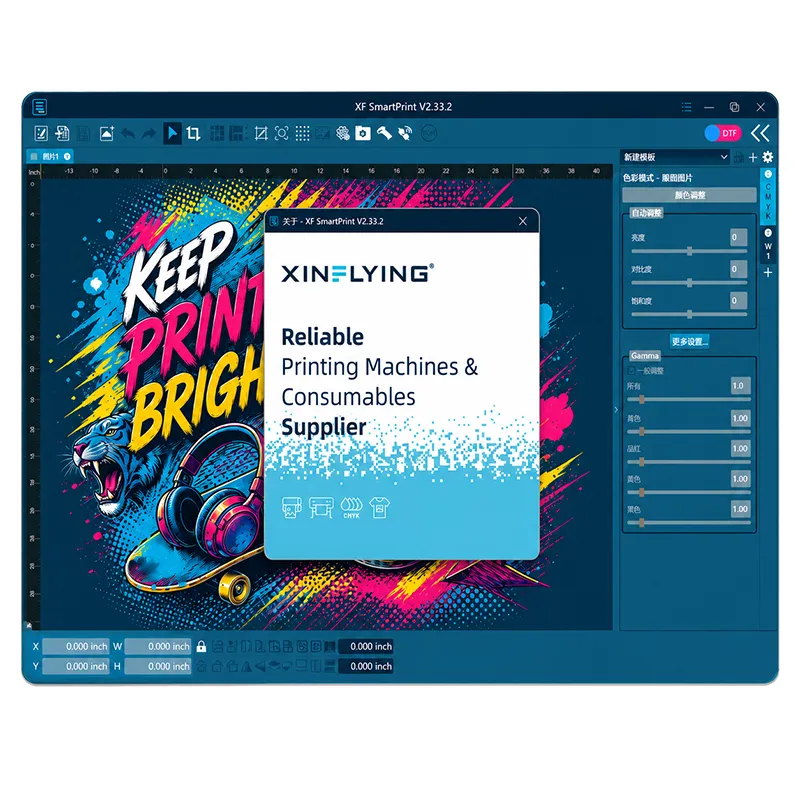
RIP SOFTWARE SUPPORT
XF SmartPrint RIP Software
Get support for XF SmartPrint setup, white-ink controls, color adjustments, and print management on compatible XINFLYING printer models.
- White-layer generation and output preview
- TIF/TIFF, JPG/JPEG, PNG, BMP, PDF, and AI file input
- Manual, automatic, and print-while-RIP modes
- Color adjustments, mirroring, and basic image controls
- Print queue, job status, and output preview
- Nine interface language options
To Help Us Diagnose Faster
Please prepare the following information before submitting your request:
- Machine model and purchase date
- Machine serial number, if available
- Photos or short videos showing the issue
- A nozzle check or test print image, where relevant
- RIP software name and operating system version
- A brief description of when the issue started
Better details. Faster guidance.
Providing visual evidence and machine details helps our technical team assess your situation before the first reply.
Frequently Asked Questions
Useful information before you submit a request.
A: Please provide your machine model, photos or videos of the issue, relevant test print results, and details about the software and consumables in use.
A: Yes. Our technical team can provide remote guidance for installation, software setup, initial operation, and basic calibration.
A: We can assist with supported RIP software installation, printer connection, basic configuration, and print workflow setup.
A: Yes. Please provide your machine model, photos of the relevant component, and a description of the issue so our team can confirm the appropriate part or solution.
A: Please refer to our Warranty & After-Sales Service page, or contact our support team with your order information.
Submit a Technical Support Request
Tell us what happened and share the key details below. After reviewing your request, our team may ask you to send photos, short videos, nozzle checks or test prints by WhatsApp or email.