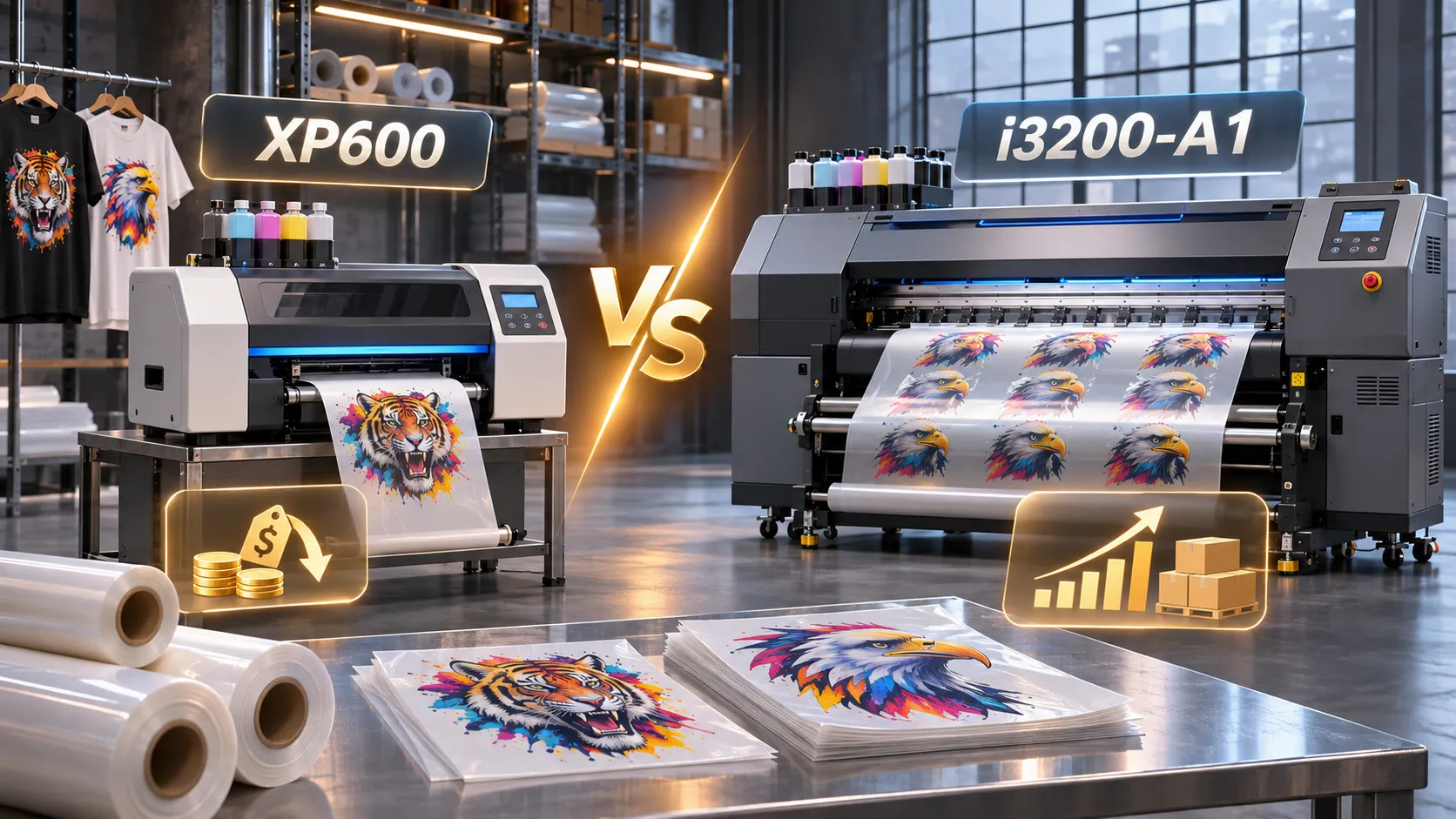
Comparing an xp600 vs i3200 dtf printhead configuration starts with separating verified component specifications from whole-printer performance. The Epson i3200-A1 is an industrial printhead engineered for aqueous (AQ) ink with an official manufacturer specification of 3,200 nozzles across 8 rows and a 33.8 mm effective print width per head, whereas XP600 is a market designation used on compact entry-level DTF printers that lacks a standalone official Epson industrial specification sheet. Even so, the printhead model alone never dictates how many sellable transfers a shop finishes per shift—printable film width, head count, channel assignment, required pass mode, white ink circulation, and curing capacity govern real output.
An xp600 dtf printer configuration keeps initial equipment outlay and single replacement head cost lower for shops validating demand or running light-to-moderate batches. Stepping up to an i3200 dtf printer configuration pays off when verified technical advantages—wider single-pass coverage per carriage sweep, high physical nozzle density, and multi-drop greyscale control—remove an active delivery bottleneck in your target quality pass mode.
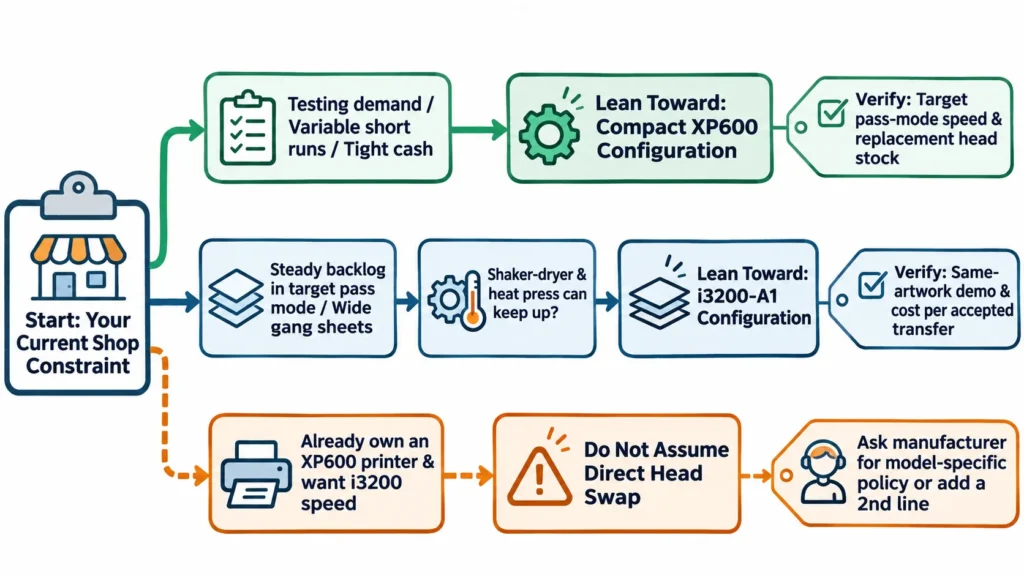
Before comparing quotes, keep one hardware boundary clear: XP600 and i3200-A1 printheads use different carriage boards, waveforms, manifolds, and capping stations, so you cannot buy an XP600 machine expecting a plug-and-play head swap later. Let’s examine the verifiable technical differences first, trace how each parameter changes daily DTF printing, and then run a same-artwork test and payback check on your orders.
Verifiable Technical Differences: XP600 vs. Epson i3200-A1 at a Glance
In any xp600 printhead vs i3200 comparison, only the Epson i3200-A1 has primary component data published on the official Epson I3200-A1 printhead specification page (Epson China official industrial printhead page). Because dealer blogs publish conflicting numbers for XP600 nozzle counts, droplet sizes, speeds, and lifespans—and sometimes equate XP600 with F1080 or various part numbers without factory documentation—the table below marks the exact evidence boundary for each field instead of guessing unverified specs.
| Technical Parameter | XP600 Configuration (Market Designation) | Epson i3200-A1 (Factory-Verified Component Spec) | What This Difference Means for Buyers |
|---|---|---|---|
| Manufacturer Spec Availability | No standalone official Epson industrial spec sheet; seller figures conflict | Published on official Epson industrial printhead sheet (I3200-A1) | Require written confirmation of exact head model, count, and channel split on any XP600 quote |
| Nozzle Count & Row Layout | Market-listed entry head; not published on an official Epson XP600 sheet | 3,200 nozzles across 8 rows (300 npi per row; 600 npi across 2 rows) | Higher physical nozzle density on i3200-A1 lays down more ink per carriage pass |
| Effective Print Width (per Head) | Narrower carriage sweep than i3200-A1 (no standalone official Epson sheet) | 33.8 mm per head (external size 69.1 × 59.4 × 35.6 mm, weight 82 g) | 33.8 mm is single-head firing width per sweep, not the machine’s 30 cm or 60 cm film width |
| Droplet & Greyscale Capability | Varies by printer board, waveform, and seller listing | VSDT multi-level greyscale: 2-level 6 pl (43.2 kHz); 3-level 6.3, 12.3 pl (21.6 kHz); 4-level 3.8, 6.1, 9.4 pl (21.6 kHz) | Variable droplets support smooth gradients and fine edges when paired with matched RIP curves |
| Ink Type, Viscosity & Max Colors | Used in CMYK+W water-based DTF printers (e.g., XINFLYING XF-400D option) | AQ (aqueous) ink at 3–4 mPa·s viscosity; supports Up to 4 ink colors per head | Because one head holds up to 4 colors and DTF needs CMYK+W, dual-head setups split color and white |
| Drive Board, Manifold & Upgrade Path | Dedicated XP600 carriage board, FFC pinout, firmware, and cap station | Dedicated i3200 board, waveform, 8-row manifold, and cap station | Not plug-and-play interchangeable; never assume an XP600 printer can swap to i3200-A1 heads |
| Durability & Warranty Boundary | Treated as a consumable part after installation and testing | Epson notes durability depends on ink, environment, printing conditions, and maintenance (lab data is not a guarantee) | Neither head carries a guaranteed month/year lifespan; budget both as operating consumables |
Check the Model Suffix on Every Quote: i3200-A1 vs. U1 vs. E1
Never accept a quotation that simply states “Epson i3200” without the suffix. Within Epson’s industrial lineup, i3200-A1 is the aqueous (AQ, 3–4 mPa·s) printhead built for water-based textile DTF pigment ink, whereas i3200-U1 is engineered for UV-curable inks (5–7 mPa·s viscosity on Epson’s I3200-U1 sheet) and i3200-E1 is built for eco-solvent inks.
Even inside water-based textile DTF equipment, different i3200 variants can be paired for specialized ink sets. In XINFLYING’s catalog, the 24″ (60 cm) XF-C602 runs 2pcs Epson i3200-A1 for standard CMYK+W, while its 9-color fluorescent configuration (CMYK+W/FY,FO,FG,FM/ORGB) pairs 1pc i3200-A1 & 1pc i3200(8)-A1HD—making written suffix verification essential for matching replacement heads and ink waveforms.
How Each Technical Difference Affects DTF Printing—and How to Verify It
A printhead parameter only becomes shop floor value when the rest of the printer supports it. Below is how each technical difference between an XP600 setup and an Epson i3200-A1 setup translates into production output, print detail, white ink stability, and hardware compatibility—along with how to verify each point before paying.
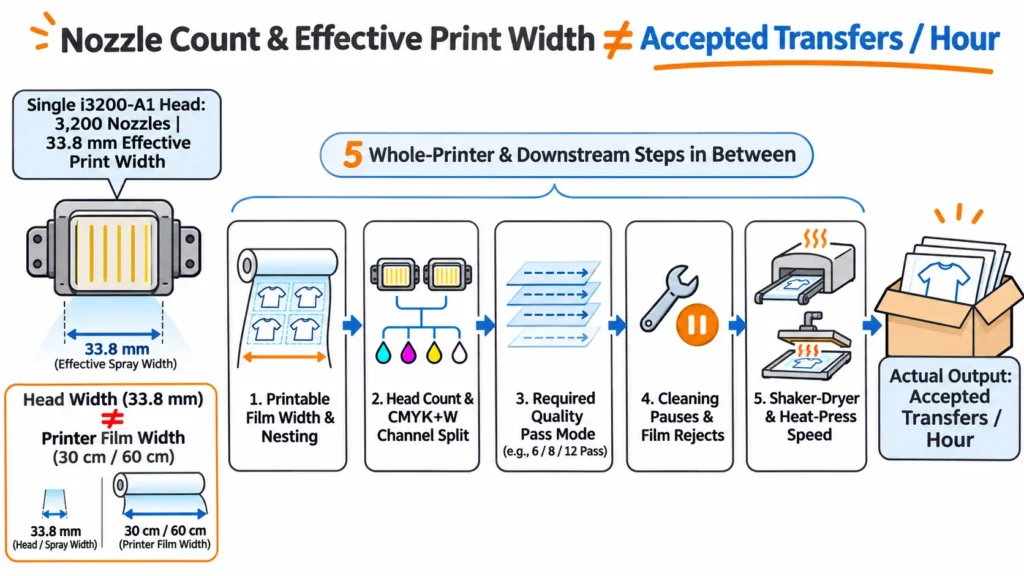
1. Nozzle Count (3,200 Nozzles) and Firing Width (33.8 mm) vs. Hourly Transfer Output
Technical difference: An i3200-A1 head fires across a 33.8 mm effective print width using 3,200 nozzles arranged in 8 rows, giving each carriage sweep substantially wider coverage and denser ink laydown than a compact XP600 head. Because one i3200-A1 head supports up to 4 ink colors and textile DTF requires at least five channels (CMYK+W), commercial DTF machines typically pair two or more heads to divide color and white channels for single-pass inline printing.
Printing impact and whole-machine constraints: Having 3,200 nozzles does not mean an i3200 machine automatically prints two, three, or six times as many sellable transfers per hour as an XP600 printer. Real hourly transfer output is governed by five connected factors:
- Head firing width (33.8 mm) vs. printable film width (12″ or 24″): 33.8 mm is how wide one head jets ink per pass, whereas 12″ (30 cm) or 24″ (60 cm) is the film deck width that determines how many graphics nest across each row on a DTF printer for gang sheets.
- Head count and channel split: Dual heads enable inline color-plus-white printing in one pass rather than doubling the speed of a single-head CMYK+W arrangement.
- Pass mode required by your artwork: Stepping from 6-pass to 8-pass or 12-pass to achieve dense white opacity or smooth halftones reduces square meters per hour on both configurations.
- Mid-run pauses and film rejects: Scheduled nozzle checks, head cleanings, white ink settling, or film skew pause the carriage and create waste, which is why buyers must judge output by sellable transfers completed per shift.
- Downstream shaker-dryer and pressing speed: If your powder shaker-dryer tunnel or heat press cannot keep pace, faster printing only queues uncut film on the take-up reel.
Comparing two complete configurations from XINFLYING’s DTF catalog illustrates why whole-machine design shapes rated output:
| Catalog Specification | XINFLYING XF-400D (with XF-400H Shaker) | XINFLYING XF-702E (with XF-Z650-2 Shaker) | Verification Note |
|---|---|---|---|
| Printing Width | 12″ (30 cm) | 24″ (60 cm) | Deck width changes how many logos fit per row |
| Print Heads | 2pcs Epson i1600-A1/XP600 (confirmed by quote) | 2pcs Epson i3200-A1 | XF-400D offers two head options; confirm which head option a quoted speed applies to |
| Print Color | CMYK+W | CMYK+W | Both run inline water-based color + white |
| Catalog Fastest Speed | 6PASS: 4.5 m²/h | 8PASS: 3.5 m²/h | 6PASS: 13 m²/h | 8PASS: 10 m²/h | 12PASS: 7 m²/h | Manufacturer ratings vary across width, frame, and head family |
| Catalog Standard Speed | 6PASS: 2.5 m²/h | 8PASS: 1.5 m²/h | 6PASS: 10 m²/h | 8PASS: 8 m²/h | 12PASS: 5 m²/h | Higher pass counts reduce hourly area on both machines |
How to verify on your orders (Illustrative Example Only): Convert any live demo into net accepted transfers per hour using this formula:
Accepted Transfers per Hour ≈ (Actual Film Area Printed per Hour in Target Pass Mode × Acceptance Rate) ÷ Film Area per Transfer (Including Spacing)
Suppose a printer covers 6.0 m²/h in a fast 6-pass mode and each transfer uses 0.10 m² of film including spacing. Switching to an 8-pass mode for a gradient logo and pausing 6 minutes per hour for nozzle checks and cleaning might lower net printed film to 3.6 m²/h; at a 95% acceptance rate, that yields about 34 accepted transfers per hour (3.6 × 0.95 ÷ 0.10 = 34.2) rather than 60.
2. Variable Droplets (VSDT) and Physical npi vs. Interpolated dpi in Fine Detail
Technical difference: Some i3200 vs xp600 posts list the XP600 at “1,440 dpi (interpolated)” alongside the i3200-A1 at “600 dpi (native),” making the entry-level head look sharper on paper. Those two numbers measure different things: 300 npi per row (600 npi across 2 rows) on the i3200-A1 is physical nozzle spacing on the nozzle plate, whereas interpolated driver dpi depends on RIP stepping and multi-pass carriage movement. In addition, the i3200-A1 supports Epson’s Variable-Sized Droplet Technology (VSDT) down to 3.8 pl in 4-level mode.
Printing impact and whole-machine constraints: High physical npi and multi-level droplet control give an i3200-A1 printer strong hardware potential for smooth skin-tone gradients, crisp micro-text, and clean color-to-white registration without stepping up to ultra-slow pass modes. However, actual detail on the pressed shirt still depends on mechanical bidirectional calibration, RIP ICC profiles, white choke settings, and PET film coating quality.
How to verify: Never rank detail by quoted dpi numbers. Print the same small knockout text, thin vector lines, and gradient ramp on both candidate printers in the exact pass mode you plan to run daily, and compare the cured and pressed garments side by side.
3. Aqueous Ink Specification (3–4 mPa·s) and White Ink Sedimentation
Technical difference: The i3200-A1 is specified for aqueous (AQ) ink within a 3–4 mPa·s viscosity window, matching industrial water-based DTF ink formulations. Both XP600 and i3200-A1 DTF printers jet white ink containing heavy titanium dioxide (TiO2) pigment.
Printing impact and whole-machine constraints: Titanium dioxide settles over time regardless of which printhead sits in the carriage. Whether a printer suffers white nozzle dropouts after an overnight pause or mid-batch run depends on whole-machine ink delivery engineering—specifically white ink circulation, tank stirring, damper filtration, and capping-station moisturizing (such as the catalog-listed Automatic moisturizing function on the XF-702E, which is a machine feature rather than a bare head trait)—combined with daily DTF printer maintenance to prevent white ink clogs.
How to verify: Ask each supplier to show the white ink circulation and stirring path on the machine, check how the capping station seals and moisturizes the heads during standby, and observe a startup nozzle check before a live demo begins.
4. Drive Electronics, Ink Manifold, and Why You Cannot Swap XP600 to i3200 Later
Technical difference: A printhead operates through a matched carriage board, main control board, FFC cable pinout, drive voltage waveform, RIP driver, mounting plate, capping station, and an ink manifold matching the head’s physical nozzle rows (8 rows on i3200-A1).
Printing impact and whole-machine constraints: Because electronic waveforms and mechanical footprints differ across head families, an XP600 printer cannot be converted to i3200-A1 heads by swapping printheads alone. Moreover, under XINFLYING’s standard warranty policy, issues caused by unauthorized modification, disassembly, or component replacement are excluded from coverage.
How to verify: If any seller claims an XP600 model can be upgraded later, ask five questions in writing before buying: (1) Does the manufacturer offer a factory-engineered conversion kit for that exact model? (2) Which boards, manifolds, cap stations, power supplies, and RIP licenses must be replaced? (3) Who installs and calibrates the kit? (4) How does conversion affect warranty coverage? (5) How does total conversion cost compare with keeping the XP600 printer as a backup line and adding a dedicated i3200-A1 machine?
How to Test Both Configurations on the Same Artwork and Garment
To make your sample test directly verify the technical differences above, require both candidate setups to run the exact same artwork file on the same film and garment type under your target finished quality standard:
- Build one standardized test file containing six elements: Small positive and reverse-white knockout text with thin vector lines; a continuous skin-tone or neutral greyscale gradient ramp; a large solid dark/vibrant color block; a solid white-underbase patch for dark fabric; sharp color-to-white registration borders; and isolated micro-dots.
- Pair the test file with one real production gang sheet: Specify the exact pass mode required to achieve sellable opacity and smooth gradients, and record the ink, PET film, and TPU powder used.
- Time a continuous run and log operator intervention: During a live or unedited video demo, record the initial nozzle check, total elapsed minutes for a multi-copy run, any mid-run cleaning pauses, film skew fixes, and rejected transfers.
- Inspect the output across all three stages: Check wet film off the platen, cured transfer after the powder shaker-dryer, and the finished transfer pressed onto your target garment.
Three-Stage Sample Inspection Checklist
| What to Inspect | Stage 1: Wet Film | Stage 2: Cured Transfer | Stage 3: Pressed on Garment | Technical & Machine Factor Tested |
|---|---|---|---|---|
| Fine lines & small text | Continuous strokes, no missing scan lines | Powder adheres without bridging tiny gaps | Crisp letters without ragged edges | Physical npi, bidirectional alignment, and pass mode |
| White edge registration | White sits cleanly inside color boundary | No stray white rim on cured edge | No white halo around colored edges | Mechanical head alignment and RIP white choke setting |
| Gradients & skin tones | Smooth dot transition, no pass banding | No clumping in light halftone areas | Soft fade without harsh steps | VSDT droplet control, RIP ICC curve, and feathering |
| White underbase opacity | Solid white layer, no starvation streaks | Uniform cured TPU surface, no pinholes | Bright color on dark fabric without dye bleed | White channel allocation, ink circulation, and dampers |
| Isolated micro-details | Clean dots hold sufficient wet ink | Stray powder shakes off blank film cleanly | Small dots release completely on peel | Droplet placement accuracy, shaker vibration, and film coat |
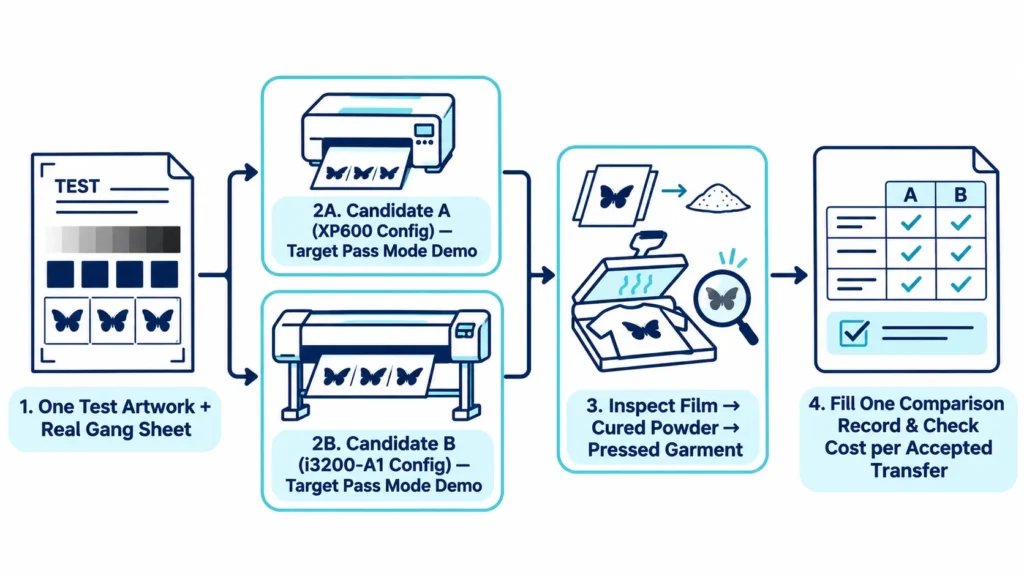
Side-by-Side Technical & Production Verification Record
Log both demos into this seven-row record so you compare verified numbers rather than brochure claims:
| Verification Item | Candidate A (XP600 Configuration) | Candidate B (i3200-A1 Configuration) | Why This Row Matters |
|---|---|---|---|
| 1. Printer Model, Exact Head Suffix, Head Count & Channel Split | Record model, head name, count, and CMYK+W split | Record model, i3200-A1 suffix, count, and channel split | Confirms carriage hardware and prevents A1 vs. U1/E1 mix-ups |
| 2. Printable Film Width, RIP Software & Required Pass Mode | e.g., 12″ (30 cm), RIP name, pass mode needed for quality | e.g., 24″ (60 cm), RIP name, pass mode needed for quality | Ties speed measurement to the pass mode your artwork actually requires |
| 3. Net Accepted Transfers (or m²) per Hour & Acceptance Rate | Record net accepted output/hour and reject rate | Record net accepted output/hour and reject rate | Measures usable capacity after pass mode and rejects |
| 4. Operator Intervention Minutes (Checks, Cleanings, Reprints) | Count pauses and hands-on operator minutes | Count pauses and hands-on operator minutes | Captures labor time and mid-run stability differences |
| 5. Three-Stage Quality Result (Fine Text, Gradients, White Opacity) | Pass/Fail notes on wet film, cured transfer, and garment | Pass/Fail notes on wet film, cured transfer, and garment | Verifies whether VSDT and white ink delivery improve finished shirts |
| 6. Matched Shaker-Dryer, Heat Press & All-In Quote Scope | Record shaker model, bundled items, and “To Confirm” fees | Record shaker model, bundled items, and “To Confirm” fees | Confirms downstream curing match and true all-in equipment price gap |
| 7. Replacement Head Price, Stock Lead Time & Wear-Part Costs | Record head price, stock source, and damper/wiper/cap costs | Record i3200-A1 head price, stock source, and wear-part costs | Supplies operating consumable inputs for cost-per-transfer math |
Choosing Between XP600 and i3200-A1: Order Fit, Operating Cost, and Payback
Once you understand the technical differences and have test data from both setups, match the configuration to your shop’s weekly print hours, replacement-part budget, and payback math. Instead of relying on arbitrary <50 or >100 daily shirt rules that ignore graphic size and pass count, calculate your required weekly print hours directly:
Required Weekly Print Hours = Weekly Film Area Needed for Orders (Including Spacing) ÷ Verified Accepted Output Speed in Target Pass Mode
Which Configuration Fits Which Production Reality?
| Shop Order & Capacity Profile | Recommended Direction | Key Technical & Financial Reason |
|---|---|---|
| Validating demand, variable short runs, or weekly print hours fit easily inside one shift (e.g., 12–20 hours/week) | Compact XP600 configuration (such as 12″ / 30 cm class) | Keeps upfront machine cost and single replacement head expense low while cash stays in blanks, film, heat presses, and marketing |
| Steady repeat orders push print hours past delivery deadlines in your required quality pass mode, or you run wide 24″ (60 cm) gang sheets daily | Epson i3200-A1 configuration with matched shaker-dryer | Wider 33.8 mm head sweep, 3,200 nozzles, and 24″ deck width reduce print hours and operator overtime when curing and pressing keep pace |
| Stepping up from entry level without jumping to a 24″ dual-i3200-A1 line | Mid-tier Epson i1600-A1 configuration | Bridges entry and high-output lines—offered as an option on XINFLYING’s 12″ XF-400D and standard on the 16.5″ (42 cm) XF-A2 and XF-450PRO-2I16A1 |
| Adding a second machine for overflow or backup | Match consumable and RIP compatibility with your existing line | Sharing ink, PET film, TPU powder, and RIP profiles simplifies operator training and inventory |
Whether you are reviewing a best DTF printer for small business guide or want to compare a compact 30 cm model with a 60 cm dual i3200-A1 model, apply the same weekly print-hour check to every candidate.
Factor in Replacement Heads, Wear Parts, and Warranty Boundaries
When comparing xp600 vs i3200 price quotes or checking i3200 printhead price ranges, treat printheads and ink-path wear parts as ongoing operating expenses rather than one-time capital costs. A replacement i3200-A1 head costs more per unit than a replacement XP600 head (confirm current pricing and stock lead time on your quote), and both configurations require regular replacement of dampers, wipers, caps, and ink tubes.
Written warranty terms explain why: under XINFLYING’s standard 12-month limited hardware warranty from shipment, manufacturing defects in non-consumable core components (such as mainboards, motors, and electrical control parts) are covered, whereas printheads after installation and successful testing and wear parts (dampers, filters, ink tubes, caps, wipers, fuses, belts, lamps, and rollers)—along with clogs from improper maintenance or environment—are excluded. Also audit every quote for bundled RIP software (such as RIIN or PrintFactory), shaker-dryer, smoke purifier, shipping/customs, and starter consumables, marking any unstated fee as “To Confirm” rather than $0.
Payback Formula: When Does the Price Difference Pay for Itself?
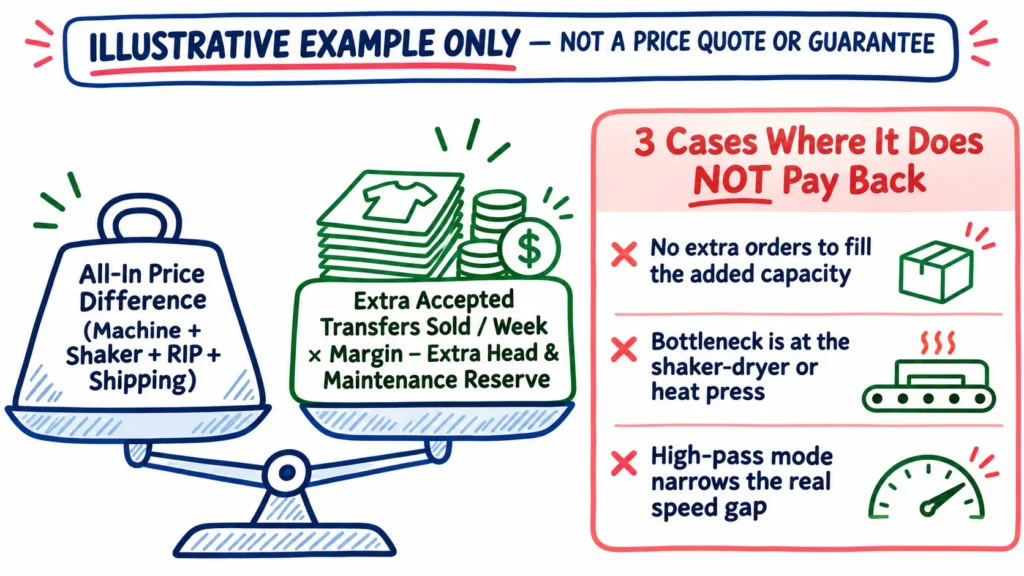
Following the same break-even logic used when comparing outsourcing DTF transfers vs buying a DTF printer, weigh the all-in equipment price gap against weekly gains from extra accepted transfers, saved operator/downtime hours, and reduced reject waste, minus the higher replacement-head reserve:
Estimated Payback Weeks ≈ All-In Equipment Price Difference ÷ [Weekly Gain from Extra Accepted Orders + Weekly Labor, Reject & Downtime Savings − Extra Weekly Head & Wear-Part Reserve]
Illustrative Example (Hypothetical Numbers Only): Suppose Candidate B (i3200-A1 configuration) costs a hypothetical $4,000 more all-in than Candidate A (XP600 configuration). If higher accepted output lets you fulfill 200 additional backlogged transfers per week at a $2.00 margin ($400/week), shorter print hours and fewer mid-run reprints save $100/week in operator labor and wasted film, and you set aside an extra $100/week for the higher-cost printhead reserve, the net $400/week benefit recovers the hypothetical $4,000 gap in 10 weeks.
Conversely, the price difference does not pay back if you lack extra orders to fill the added capacity, if garments wait at a slow curing belt or single heat press, or if frequent tiny setups keep both machines idle between jobs.
Frequently Asked Questions
Is the i3200 always faster than the XP600?
At the component level, an Epson i3200-A1 head has 3,200 nozzles and a 33.8 mm effective print width per head, giving it higher raw ink ejection capacity than an XP600 head. Whole-printer speed still depends on printable film width, head count, channel assignment, required pass mode, and cleaning pauses, so always compare net accepted transfers per hour on the same artwork.
How long does an i3200 printhead last in DTF?
How long an i3200 printhead lasts in DTF production has no guaranteed month-or-year figure. Epson states on its official I3200-A1 specification page that durability depends on ink, operating environment, printing conditions, and maintenance methods, and that its laboratory figures are not a quality guarantee—so budget printheads as consumables.
Is an XP600 DTF printer good for a small business?
Yes—an XP600 configuration fits well when validating demand or running light-to-moderate batch volumes where lower upfront machine and single replacement head costs protect cash flow. Verify that its output speed in your target quality pass mode meets your delivery deadlines and follow daily white-ink maintenance.
Can an XP600 DTF printer print white ink?
Yes, XP600 DTF printers commonly run CMYK+W water-based pigment inks (for example, XINFLYING’s 12″ XF-400D runs CMYK+W). Long-run white ink stability depends on the printer’s complete circulation, stirring, and capping-station moisturizing hardware plus daily maintenance rather than the printhead name alone.
Can I use an i3200-U1 head in a textile DTF printer?
No—water-based textile DTF printers covered in this guide require the aqueous i3200-A1 version (AQ ink, 3–4 mPa·s viscosity). The i3200-U1 is engineered for UV-curable inks (5–7 mPa·s viscosity), so confirm that your textile DTF quotation explicitly specifies i3200-A1.
Does a dual-head printer double the output?
Not necessarily. Because one i3200-A1 head supports up to 4 ink colors and textile DTF requires CMYK+W, dual-head printers typically split color and white channels across the two heads for single-pass inline printing rather than doubling the speed of a single-head CMYK+W machine.
What is the best DTF printhead?
There is no single best dtf printhead separated from your order profile. Shops testing demand or printing modest weekly hours often fit an XP600 or mid-tier i1600-A1 setup, while shops with steady backlog and matching curing capacity benefit from an i3200-A1 configuration.
Compare Configurations Using Your Own Artwork and Order Volume
Send us 2 to 3 of your regular order artwork files, target garment fabrics, weekly transfer volume, turnaround window, and any current printer model you run. Our team will recommend a matched setup from our DTF printers lineup and provide every specification needed for your verification record—including exact printhead model and suffix, pass-mode ratings, quotation inclusions, replacement head availability, and technical support arrangements.