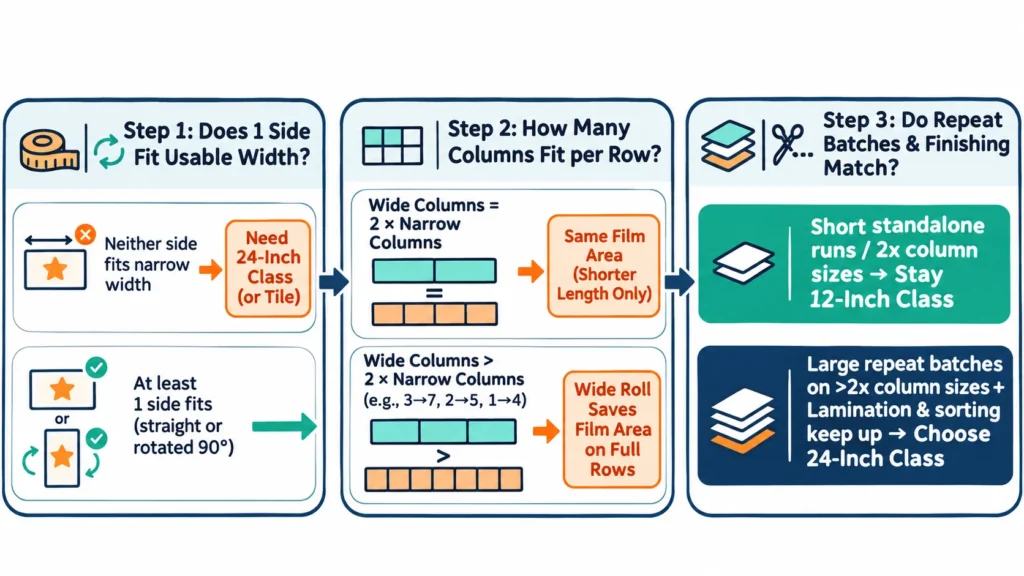
A practical uv dtf printer size comparison comes down to three questions: does your graphic fit inside the confirmed usable print width (straight or rotated 90 degrees), how many whole copies fit across one row, and do your repeat batch sizes and post-print workflow turn a wider roll into net savings? For most hard-surface stickers, brand logos, phone-case decals, and rotated cup wraps, a 12-inch-class (about 30 cm) roll-fed UV DTF printer covers daily production at a lower equipment, space, and power cost.
Stepping up to a 24-inch-class (about 60 cm) printer pays off in only two situations: when recurring designs exceed the narrow printer’s usable width on both sides even after 90-degree rotation, or when repeat batches are large enough to fill wider rows on decal sizes where doubling width yields more than double the columns per row. When a wider roll merely doubles column count, it cuts roll length in half without saving square meters of film—and on small standalone jobs, per-job leader waste can make a 60 cm roll consume more film area than a 30 cm roll.
Below, we walk through the decision step by step: which width specification to compare on a quote, how 90-degree rotation changes fit, how to calculate columns per row and total order film area, how width interacts with lamination and sorting labor, and how to combine your orders, floor space, and investment into a final choice.
Quick Answer: Which UV DTF Printer Width Fits Your Orders?
Instead of relying on arbitrary weekly sticker counts or broad size labels, match your recurring artwork geometry and batch sizes to the decision rules below:
| Your Order Geometry & Batch Pattern | Width Class to Lean Toward | What to Calculate or Verify Before Paying |
|---|---|---|
| Designs fit the narrow usable width and wide rows only double column count (wide columns = 2 × narrow columns, such as 5 cm, 8–9 cm, or 13 cm on 28 vs. 58 cm usable width) | 12-inch class (about 30 cm) | Wide rolls only shorten roll length without reducing square meters (m²) of film |
| Repeat batches of dozens or hundreds on sizes where wide rows hold more than double the columns (wide columns > 2 × narrow columns, such as 7–7.6 cm, 10 cm, 14 cm, or 18 cm) | Run full-order area math on both; 24-inch class (~60 cm) cuts film m² on full rows | Verify that batch quantity fills complete rows and that lamination and sorting keep pace |
| Cup wraps or rectangular decals where one side exceeds narrow usable width, but the shorter side fits | 12-inch class works (1 per row rotated 90°); 24-inch class fits multiple across | Confirm 90° rotation is acceptable for your artwork and compare total m² per batch |
| Large sign or display decals where both width and height exceed narrow usable width | 24-inch class (about 60 cm) | Confirm in writing that the wider usable width holds the full graphic plus margins |
| Small standalone orders (e.g., 5–10 pcs per job) or unverified demand | 12-inch class (about 30 cm) or outsource first | Partially filled wide rows and 60 cm per-job leader strips waste more film area than 30 cm rolls |
The exact column breakpoints depend on each printer’s confirmed usable print width after side margins and your cutting gap; use the formulas in the next sections to test your own top-selling sizes.
Which Width Number Should You Compare on a UV DTF Quote?
When buyers ask what sizes do uv dtf printers come in, product pages mix labels like “A3”, “A3+”, “12-inch”, “30 cm”, “24-inch”, and “600 mm”. Every roll-fed UV DTF printer actually involves four distinct width numbers—its marketing class label, listed printing width, media (film) width, and confirmed usable image width after side margins—plus a separate machine footprint. Because layout math only works with confirmed usable image width, always require that exact number in writing on your quotation.
- Width class labels (A3, 12-inch, 24-inch): ISO A3 sheet paper measures 297 × 420 mm, and roll-fed printers borrow “A3” as shorthand for an approximate 30 cm (about 12-inch) roll class whose length feeds continuously. Labels such as “A3+” or “13-inch” vary by seller, so never plug a class name into your layout formula.
- Listed printing width vs. media width: A spec sheet may list either printable width or film roll width. In XINFLYING’s product lineup, the XF-450S-3 lists Printing Width: 12″ (30CM), whereas the XF-600-3I32U1 lists Consumable Size: Width 600mm, Unlimited length (media width), meaning you must confirm its net usable print width on the quote.
- Confirmed usable image width: Film edge guides, pinch rollers, RIP registration marks, and B-film lamination clearance all reserve side margins. Losing just 1 cm of usable width can drop an entire column per row on specific decal sizes.
- Flatbed “A3 / A4” bed size vs. roll-fed width: Direct-to-object UV flatbed printers use “A3” or “A4” to describe a fixed table rectangle, which cannot be compared directly with continuous roll-fed UV DTF width.
Manufacturer-Listed Specifications: 12-Inch Class vs. 24-Inch Class
This table compares XINFLYING’s two standard hard-surface UV DTF decal configurations to show what product spec fields tell you—and what you must confirm—when you compare current UV DTF configurations:
| Specification Item | XINFLYING XF-450S-3 | XINFLYING XF-600-3I32U1 | What to Check for Width Selection |
|---|---|---|---|
| Width Class | 12-inch class (~30 cm) | 24-inch class (~60 cm) | Initial category filter only |
| Listed Width Field | Printing Width: 12″ (30CM) | Consumable Size: Width 600mm, Unlimited length (media width) | Request confirmed usable print width after margins in writing |
| Printheads | 3pcs Epson i1600-U1 | 3pcs Epson i3200-U1 | Equal head count (3pcs) does not mean equal printhead model or speed |
| Ink Channels | CMYK + W + V | CMYK + W + V | Both jet white underbase, color, and clear varnish inline |
| Lamination | Not stated in spec table; confirm laminating arrangement in quote | Built-in (with Auto Laminating Device) | Determines post-print film handling and operator steps |
| Listed Speed | 8pass: Fastest 3.5 m²/h | Standard 2.75 m²/h | 6PASS: Fastest 8 | Standard 6.28 m²/h 8PASS: Fastest 6.16 | Standard 4.85 m²/h | Manufacturer-listed ratings by pass mode; do not divide across models as a fixed multiplier |
| Dimensions & Weight | 1,300 × 1,000 × 1,450 mm | 120 kg net | 2,000 × 820 × 1,600 mm | 275 kg net | Governs doorway access, floor clearance, and table layout |
| Power Requirement | 1 kW | 3 kW | Governs shop electrical circuit readiness |
Note that inch and centimeter class labels (12″ / 30 cm and 24″ / 60 cm) are approximate industry groupings rather than exact mathematical conversions.
Will Your Design Fit, and Does 90° Rotation Help?
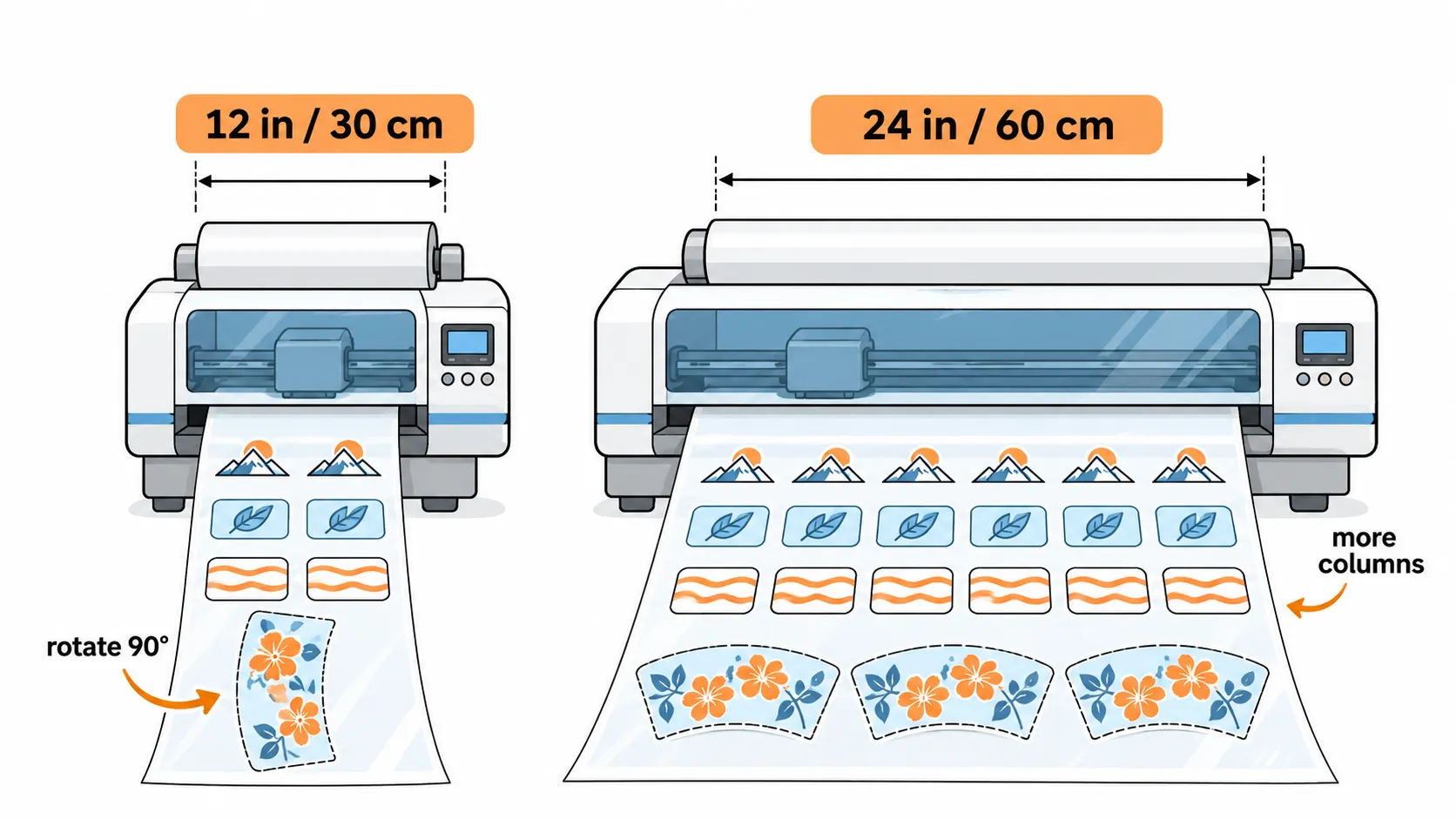
A decal with one side longer than 12 inches does not automatically require a 24-inch printer. Because roll-fed A-film runs continuously along the feed direction, any rectangular graphic fits on a narrow printer as long as at least one of its two dimensions (plus side margins and cutting gaps) fits inside the confirmed usable width—you simply rotate the artwork 90 degrees so the longer side runs along the roll length. Only graphics whose width and height both exceed the narrow usable width require a wider roll or multi-piece tiling.
Verify fit and orientation in four steps: measure both dimensions of your finished decal, add your cutting gap (e.g., 0.5 cm) to each dimension, compare both numbers against the candidate printer’s confirmed usable width, and calculate how many copies fit across a row in both 0-degree and 90-degree orientations.
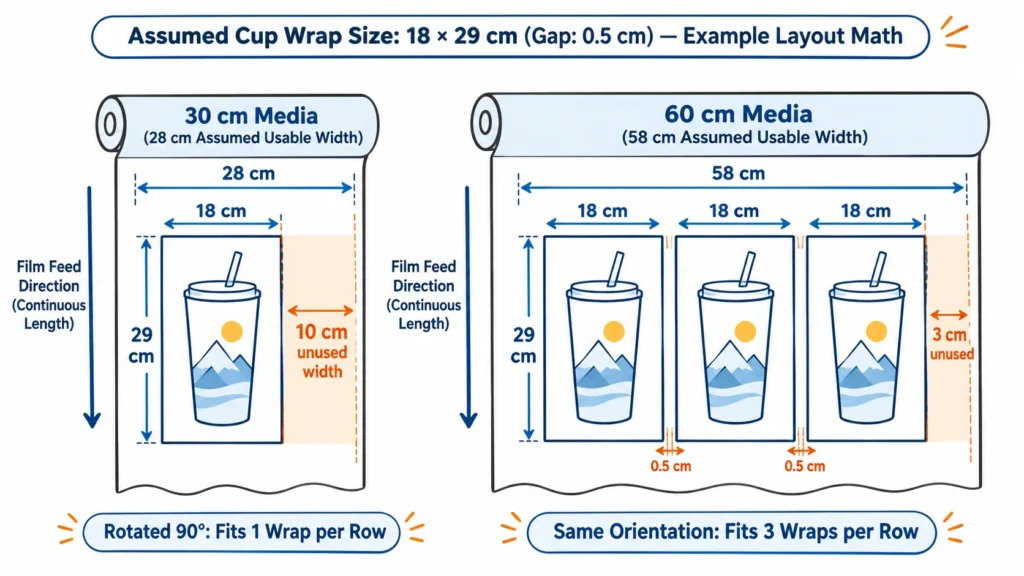
- Tumbler wrap rotation example (18 × 29 cm assumed size; measure your own blank): On an assumed 28 cm usable width (30 cm media), the 29 cm wrap width (~11.4 in) cannot sit horizontally across the roll. Rotating the file 90 degrees places the 18 cm side (~7.1 in) across the width and runs 29 cm along the film feed, fitting 1 wrap per row with 10 cm of unused side width (see how to make UV DTF cup wraps for wrap sizing details). On an assumed 58 cm usable width (0.5 cm gap), placing that same 18 cm side across the width fits 3 wraps per row (55 cm used), whereas placing the 29 cm side across fits only 1 wrap per row—orientation alone triples row capacity on the wider machine.
- Oversized sign decal example (35 × 32 cm assumed size): Because both 35 cm and 32 cm exceed a 28 cm narrow usable width, a 12-inch-class printer cannot print this decal in one piece. On a 58 cm usable width, placing 35 cm across fits 1 decal per row and leaves a 23 cm side strip; filling that strip with smaller logos saves film area, though mixing different customer orders on one roll adds manual cutting and sorting time.
- Technical check before rotating: Confirm on a physical sample that rotating the graphic 90 degrees does not alter varnish gloss appearance, B-film lamination tension, or hand-peeling behavior on the curved blank.
How Many Designs Fit Across Each Row? (Column Step-Jump Math)
Because a single row across the roll can only hold whole decals, doubling usable width does not automatically double the number of columns per row. Calculate exact integer columns per row with this floor formula:
Designs per Row = floor[(Usable Print Width + Gap) ÷ (Design Width + Gap)]
Assumptions for This UV DTF Printer Size Comparison Chart: Narrow usable width = 28 cm (~11.0 in) on 30 cm media; wide usable width = 58 cm (~22.8 in) on 60 cm media; cutting gap = 0.5 cm (~0.2 in); square decals measured horizontally. These are illustrative math assumptions, not confirmed usable widths for the XF-450S-3 or XF-600-3I32U1.
| Design Width | Narrow (28 cm Usable) / Row | Wide (58 cm Usable) / Row | Media Width Used per Decal (Narrow vs. Wide) | Column Ratio & Film Area Impact |
|---|---|---|---|---|
| 5 cm (~2 in) | 5 | 10 | 6.0 cm vs. 6.0 cm | 2.0× columns (Equal area efficiency): Wide roll only halves roll length |
| 7–7.6 cm (~2.75–3 in) | 3 | 7 | 10.0 cm vs. 8.6 cm | 2.33× columns:Wide saves ~14% film area (7 across instead of 6) |
| 8–9 cm (~3.1–3.5 in) | 3 | 6 | 10.0 cm vs. 10.0 cm | 2.0× columns (Equal area efficiency): Same square meters on full rows |
| 10 cm (~3.9 in) | 2 | 5 | 15.0 cm vs. 12.0 cm | 2.5× columns:Wide saves 20% film area (5 across vs. 2) |
| 13 cm (~5.1 in) | 2 | 4 | 15.0 cm vs. 15.0 cm | 2.0× columns (Equal area efficiency): Same square meters on full rows |
| 14 cm (~5.5 in) | 1 | 4 | 30.0 cm vs. 15.0 cm | 4.0× columns:Wide saves 50% film area (4 across vs. 1) |
| 18 cm (~7.1 in) | 1 | 3 | 30.0 cm vs. 20.0 cm | 3.0× columns:Wide saves ~33% film area (3 across vs. 1) |
| 20–28 cm (~7.9–11 in) | 1 | 2 | 30.0 cm vs. 30.0 cm | 2.0× columns (Equal area efficiency): Same square meters on full rows |
| 29 cm (~11.4 in) | 0 (must rotate) | 1 | — vs. 60.0 cm | Rotate first: Horizontal placement on wide wastes half the 60 cm width |
As this table proves, film savings do not follow a simple “small vs. large decal” rule—a 7.5 cm sticker saves ~14% film area on a wider roll (3 vs. 7 columns), whereas an 8 cm or 13 cm sticker saves 0% area (3 vs. 6 and 2 vs. 4 columns). Whenever wide columns > 2 × narrow columns, the wider roll converts the narrow roll’s leftover side margin into an extra productive column; whenever wide columns = 2 × narrow columns, both widths consume the exact same square meters of film on full rows.
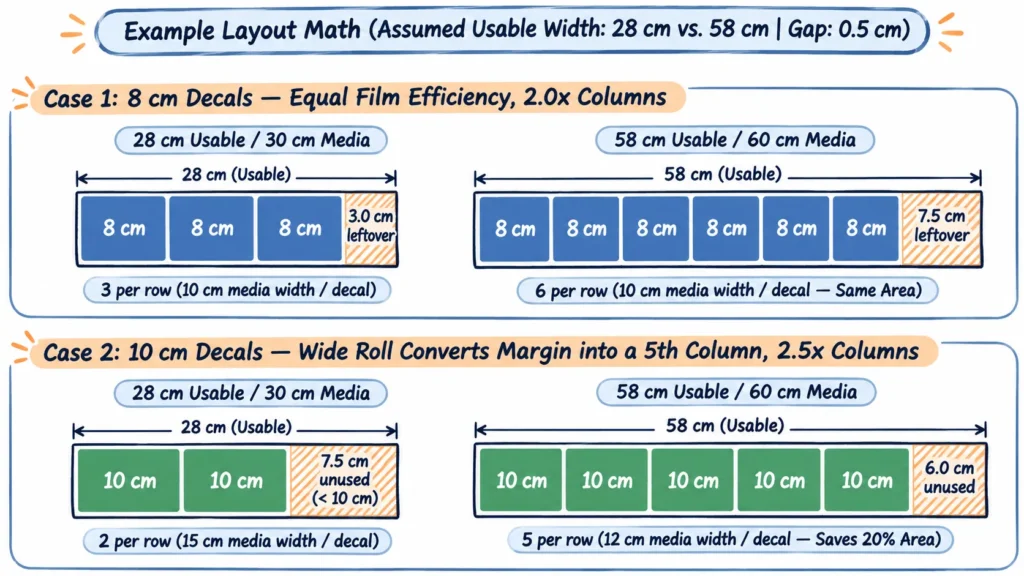
A 1 cm shift in confirmed usable width also moves these step-jump boundaries: if a narrow printer’s usable width is 27 cm instead of 28 cm, a 9 cm decal drops from 3 columns to 2 columns per row while an 8 cm decal stays at 3. Because RIP auto-nesting can pack mixed sizes or contours tighter than a uniform rectangular grid, always test your real production files in the supplier’s RIP software.
How Much Film Does the Same Order Use on 30 cm vs. 60 cm Rolls?
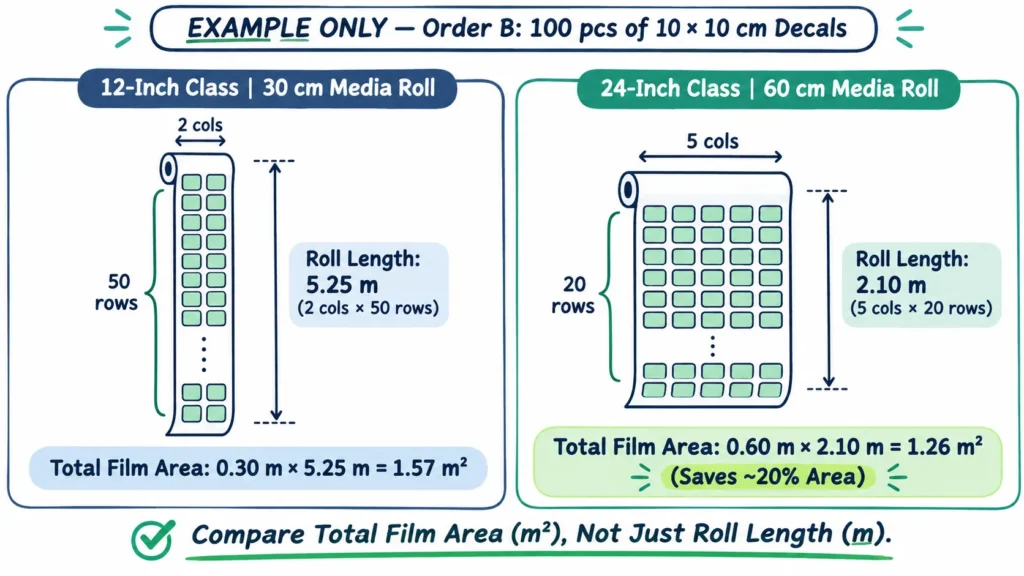
In any 12 inch vs 24 inch uv dtf printer evaluation, roll length (meters) only tells you how long the print takes to feed—your consumable invoice is determined by total film area (Media Width × Film Length). Calculate full-order consumption with three equations:
- Rows = ceiling(Order Quantity ÷ Designs per Row)
- Film Length = Rows × (Design Height + Gap) − Gap + Per-Job Leader
- Film Area = Media Width × Film Length
Using the same illustrative assumptions (28 cm usable on 30 cm media vs. 58 cm usable on 60 cm media, 0.5 cm gap, and 0 cm leader initially), here is how five representative orders compare across both widths:
| Order Scenario (Illustrative Math) | Narrow (30 cm Media): Cols×Rows / Length / Area | Wide (60 cm Media): Cols×Rows / Length / Area | Film Area & Production Outcome |
|---|---|---|---|
| A. 100 pcs 8 × 8 cm decals | 3 × 34 / 2.89 m / 0.87 m² | 6 × 17 / 1.44 m / 0.86 m² | Roll length halves, but total film area is nearly identical (3 vs. 6 columns) |
| B. 100 pcs 10 × 10 cm decals | 2 × 50 / 5.25 m / 1.57 m² | 5 × 20 / 2.10 m / 1.26 m² | Wide saves ~20% film area (0.31 m² saved per 100-piece batch) |
| C. 50 pcs 18 × 29 cm cup wraps (18 cm across) | 1 × 50 / 14.75 m / 4.42 m² | 3 × 17 / 5.01 m / 3.01 m² | Wide saves ~32% film area and cuts printed roll length by nearly two-thirds |
| D. 100 pcs 14 × 14 cm decals | 1 × 100 / 14.50 m / 4.35 m² | 4 × 25 / 3.62 m / 2.17 m² | Wide saves ~50% film area (4 across vs. 1 across with wide side waste) |
| E. 6 pcs 10 × 10 cm decals (standalone short run) | 2 × 3 / 0.31 m / 0.09 m² | 5 × 2 / 0.21 m / 0.12 m² | Wide uses ~33% MORE film area because Row 2 holds only 1 decal and 4 empty slots |
Now factor in per-job leader and trailer waste on Order E: if every separate print-and-cut run consumes an assumed 20 cm (0.20 m) of unprinted leader/trailer film (confirm the exact feed loss on your candidate machine), that 20 cm strip wastes 0.06 m² on a 30 cm roll (0.30 × 0.20) but 0.12 m² on a 60 cm roll (0.60 × 0.20). Adding that leader turns Order E into 0.15 m² on the narrow roll vs. 0.24 m² on the wide roll—demonstrating why printing small standalone orders one by one penalizes a wider machine.
Note: All figures above are illustrative layout math rather than machine test results. Replace the assumed usable widths, gaps, and leader lengths with confirmed numbers from your supplier.
To avoid partial-row and leader waste on a wide printer, operators often gang multiple small customer orders onto one sheet. However, tight multi-order ganging increases manual slitting, counting, and bagging minutes—and a single lamination crease or sorting mistake spoils more jobs at once. Use tight nesting for identical repeat runs, and when batching mixed customer jobs, weigh saved film against extra finishing labor; see how to keep each order easy to separate and compare tight vs grouped layouts.
Does a Wider Roll Deliver Higher Accepted Output and Labor Savings?
When evaluating a 30cm vs 60cm uv dtf printer, higher listed m²/h ratings do not automatically translate into twice as many sellable decals per shift. Convert measured area speed into net accepted decals per hour using your order’s actual per-decal film area (including margins and gaps):
Accepted Decals per Hour ≈ Measured Film Area per Hour in Required Pass Mode × Acceptance Rate ÷ Film Area per Decal (Including Margins and Waste)
Because the denominator comes directly from your row and batch math, a wider printer only multiplies hourly decal output when both its verified print speed in your required quality pass mode and its column utilization work in your favor. Check four operational factors before assuming a wider roll will cut labor or double daily output:
- Never divide listed m²/h speeds across different models: In XINFLYING’s UV DTF lineup, the XF-450S-3 (3pcs i1600-U1, 8pass: 3.5 / 2.75 m²/h) and XF-600-3I32U1 (3pcs i3200-U1, 6PASS: 8 / 6.28 m²/h; 8PASS: 6.16 / 4.85 m²/h) use different printhead models and test conditions—always time your own file in the pass mode required for smooth varnish and crisp small text.
- Inline vs. separate B-film lamination: The XF-600-3I32U1 includes a built-in Auto Laminating Device that laminates B-film inline during printing, whereas for the XF-450S-3 you should confirm the laminating arrangement in the quote; if any setup uses an external laminator, verify its working width matches your film roll.
- Roll-change savings vs. slitting and sorting time: On long repeat batches (like Orders B, C, and D), a 60 cm roll cuts printed length by 50% to 75% and reduces roll changes, but wider sheets require longer cross-cuts and more table space to slit into individual stickers.
- Time the complete workflow: Before deciding, time a repeat layout and a mixed batch from RIP nesting through printing, lamination, slitting, and inspection, recording both accepted decals and hands-on operator minutes.
Combining Orders, Space, and Investment: How to Make Your Final Choice
Your final selection brings together four realities: order geometry and batch volume, shop room and power constraints, all-in payback math, and a side-by-side verification record.
1. Check Floor Space, Doorway Access, Weight, and Power First
A wider UV DTF printer requires substantially more room and electrical capacity. In XINFLYING’s product lineup, the 12-inch-class XF-450S-3 measures 1,300 × 1,000 × 1,450 mm, weighs 120 kg net, and draws 1 kW, whereas the 24-inch-class XF-600-3I32U1 measures 2,000 × 820 × 1,600 mm, weighs 275 kg net, and draws 3 kW. Beyond machine dimensions, budget clearance for loading 600 mm film rolls, service access around the frame, and a wider cutting table, and compare A/B film quotes by price per square meter ($/m²) rather than price per roll.
2. Calculate Payback Across Material, Labor, Accepted Yield, and Extra Investment
When auditing quotes, list every included item and mark any unstated fee (shipping, customs, RIP, laminator, starter consumables) as “To Confirm” rather than $0 (see what a UV DTF quote should include). Estimate how quickly the extra investment for a wider configuration pays back by combining weekly film savings, net operator labor saved (roll-handling and lamination time saved minus extra sorting time), and margin from additional accepted decals sold:
Weekly Net Benefit ≈ (Weekly Film Area Saved in m² × Film Cost per m²) + [(Print & Lamination Minutes Saved − Extra Sorting Minutes) × Hourly Labor Rate ÷ 60] + Margin from Extra Accepted Decals Sold
Estimated Payback Weeks ≈ Extra All-In Equipment, Shipping & Facility Setup Cost ÷ Weekly Net Benefit
Extra width does not pay back if most of your orders sit in equal-efficiency column brackets (wide columns = 2 × narrow columns), if you print many small standalone jobs where wide leader waste outweighs column gains, or if finished sheets pile up at your cutting and packing table.
3. Log Your Top Three Orders in One Side-by-Side Comparison Record
Before paying a deposit, ask both suppliers to confirm usable print width and run your most demanding order, then fill in this eight-row decision record:
| Decision Check | Narrow Candidate (12-Inch / ~30 cm Class) | Wide Candidate (24-Inch / ~60 cm Class) | What This Row Decides |
|---|---|---|---|
| 1. Exact Model, Listed Width Field & Confirmed Usable Width | e.g., XF-450S-3 (Printing Width: 30 cm); record net usable cm | e.g., XF-600-3I32U1 (Media Width: 600 mm); record net usable cm | Establishes the true printable width after side margins |
| 2. Lamination Method & Per-Job Leader Waste (cm & m²) | Confirm lamination in quote; record leader loss per job | e.g., Built-in Auto Laminating Device; record leader loss | Reveals post-print handling and short-run film waste |
| 3. Order 1 (Most Common Decal): Cols×Rows, Length & Total m² | Record cols × rows, m, and m² | Record cols × rows, m, and m² | Tests whether everyday orders actually save film area |
| 4. Order 2 (Largest Decal / Wrap): Fit, Orientation & Total m² | Fits straight / Rotated 90° / Does not fit (m²) | Fits straight / Rotated 90° (cols × rows, m²) | Verifies whether oversized jobs force a wider roll |
| 5. Order 3 (Largest Repeat Batch): Cols×Rows, Length & Total m² | Record cols × rows, m, and m² | Record cols × rows, m, and m² | Measures bulk material and roll-length reduction |
| 6. Live Demo: Net Accepted Decals/Hour & Finishing Minutes | Record accepted output, reject rate, and slitting/sorting time | Record accepted output, reject rate, and slitting/sorting time | Captures real sellable speed and operator labor balance |
| 7. Footprint, Weight (120 vs. 275 kg) & Power (1 vs. 3 kW) Fit | Verify doorway, floor space, and 1 kW circuit | Verify doorway, floor space, and 3 kW circuit | Prevents installation surprises on delivery day |
| 8. All-In Quote Scope, Film Cost per m² & Payback Weeks | List included items, “To Confirm” fees, and film $/m² | List included items, “To Confirm” fees, and payback weeks | Connects order math directly to return on investment |
4. Final Decision Rules: Stay Narrow, Go Wide, or Wait
- Choose a 12-inch-class (~30 cm) printer when: Your regular decals and rotated cup wraps fit inside the narrow usable width, most orders either sit in equal-efficiency column sizes (wide columns = 2 × narrow columns) or run as small separate batches, or room space (1,300 × 1,000 × 1,450 mm, 120 kg), power (1 kW), and upfront budget are tight. Trade-off: High-volume repeat batches require longer film runs and more roll changes, and occasional graphics exceeding narrow width on both sides must be tiled or outsourced.
- Choose a 24-inch-class (~60 cm) printer when: Recurring designs exceed the narrow usable width in both dimensions, repeat batches regularly fill rows on sizes where wide columns > 2 × narrow columns (such as 7–7.6 cm, 10 cm, 14 cm, or 18 cm), inline lamination (Auto Laminating Device) and shorter roll runs relieve an active production bottleneck, and your shop accommodates a 2,000 × 820 × 1,600 mm, 275 kg, 3 kW machine. Trade-off: Standalone small jobs waste more film per leader strip, and ganged multi-customer sheets require disciplined cutting and sorting.
- Wait or outsource first when: Order volume is still unverified, or your bottleneck is manual weeding/cutting and decal application rather than print width. Only buy extra width for future growth when you can name the specific upcoming contracts that will fill wider rows; also note that intermediate 16.5-inch (42 cm) machines exist (configured in XINFLYING’s product lineup for specialized 3D embroidery or gold-stamping workflows) and follow the exact same column formula.
Frequently Asked Questions
Roll-fed UV DTF printers are most commonly offered in 12-inch / 30 cm, 16.5-inch / 42 cm, and 24-inch / 60 cm width classes. Because product sheets may list either printing width or media roll width, always ask for the confirmed usable print width after side margins.
An a3 uv dtf printer belongs to the same approximate width class as a 12-inch (30 cm) roll-fed printer. ISO A3 paper has a 297 mm short edge, while roll-fed listings may label A3-class machines as 30 cm, 11.8 in, or 13-inch class—check the exact printable width specification on the quote.
In an A3 vs A4 UV DTF printer comparison, A3 is larger (ISO A3 measures 297 × 420 mm vs. A4 at 210 × 297 mm). Keep in mind that “A4” and “A3” often describe fixed flatbed table areas, whereas roll-fed UV DTF machines print continuously along the length of the film roll.
When deciding what size uv dtf printer for cups fits your shop—or checking what size uv dtf printer for tumbler wraps handles full-bleed sleeves—measure your actual cup circumference and height first. If at least one dimension plus margins fits the narrow usable width (for example, an 18 × 29 cm wrap placed with its 18 cm side across a 28 cm usable width), you can rotate it 90 degrees to print 1 wrap per row on a 12-inch-class printer, while a 24-inch-class printer fits 3 wraps across each row.
Not automatically. Hourly output depends on the printhead model, pass mode required by your artwork, and column utilization across the roll, so compare net accepted decals finished per hour using the same file.
Only when your decal width allows the wider roll to pack more than twice as many columns per row (wide columns > 2 × narrow columns, such as 7–7.6 cm, 10 cm, 14 cm, or 18 cm in our 28 vs. 58 cm chart) and your order quantity fills complete rows. When columns merely double, both widths use the same square meters of film, and small standalone jobs can use more film on a wide roll.
Yes—because roll film feeds continuously lengthwise, you can print graphics longer than the roll width as long as the perpendicular side plus margins fits inside the confirmed usable print width and your operator can laminate and apply the long decal cleanly.
Only if you have specific, scheduled orders that either exceed the narrow usable width on both sides or run in large repeat batches on column sweet-spot sizes; otherwise, start with the width that fits your current orders and outsource rare oversized decals.
Compare Printer Widths Using Your Own Decal Dimensions
Send us the dimensions of 3 of your regular decal or cup-wrap orders (noting whether 90-degree rotation is allowed), typical batch quantities, weekly repeat frequency, and target product surfaces. Our team will reply with the confirmed usable print width, laminating arrangement, and full quotation scope for our UV DTF printer machines so you can complete your order comparison record before deciding.