The best DTF printer for a small business is rarely the machine with the highest advertised speed. It is the machine that fits the orders you actually take, the space you have, the maintenance your team can perform, and the support you can access when a production day goes sideways.
For many small apparel businesses, a DTF setup is attractive because it can handle varied artwork and mixed garment materials without requiring a screen for every color. But “small business” does not automatically mean “smallest printer.” A home-based custom apparel brand, an Etsy seller, a local print shop, and a growing contract decorator may all need different workflows.
This guide shows how to evaluate a DTF printer as an operating system, not just a box with printheads.
Start With Your Order Mix, Not the Printer Specification Sheet
Before comparing printer models, write down the work you expect to produce over the next six to twelve months:
- Typical order quantity: one-offs, small batches, or repeated runs?
- Most common print size: left chest, full front, sleeve logo, or gang sheet?
- Garment mix: cotton tees, polyester teamwear, hoodies, bags, workwear?
- Design profile: simple logos, photographs, dense artwork, or lots of small text?
- Peak demand: steady daily work or weekend/event spikes?
- Available operator time: who will run nozzle checks, clean, and monitor white ink?
This exercise normally reveals whether you need a compact production setup, a wider machine for large gang sheets, or a higher-output system with more automation.
What “Best” Means for a Small DTF Business
A good small-business DTF printer should provide enough capacity without creating a maintenance burden or workflow bottleneck. In practical terms, look for balance across six areas.
1. Print Width That Matches Your Best-Selling Jobs
Print width affects the size of transfers you can produce and how efficiently you can gang designs together. A 16.5-inch class machine is often a practical starting point for shirt graphics, chest prints, sleeve designs, and mixed gang sheets.
It is not automatically the right answer for every shop. If your core business is long production runs, wide artwork, or high-volume gang sheets, a 24-inch configuration may give you more room and higher throughput. But wider equipment also requires more space, more material handling, and often more operator attention.
The question is not “What is the widest printer I can afford?” It is “What width lets me print the work I sell with the least wasted film and least unnecessary complexity?”
2. A Realistic White-Ink Maintenance Routine
White ink makes DTF possible on dark garments, but it is also where many new operators underestimate the workload. A low price is not a bargain if the system is difficult to maintain, lacks a stable white-ink circulation routine, or leaves you without troubleshooting support.
Before buying, ask the supplier specific questions:
- How is white ink circulated and agitated?
- What is the daily start-up and shutdown procedure?
- How often should nozzle checks be performed?
- What happens if the printer is idle for several days?
- Are cleaning, capping, and flushing steps documented?
- Which parts are consumable, and how quickly can they be supplied?
A supplier that can explain the routine clearly is usually more useful than one that only repeats printhead specifications.
3. The Complete Powdering and Curing Workflow
DTF printing does not end when the image leaves the printer. The powdering and curing stage is where the adhesive layer becomes ready for transfer. A mismatch between printer speed and curing capacity creates a bottleneck – and bottlenecks tend to produce rushed, inconsistent transfers.
Evaluate the complete workflow:
- Is powder application even and controllable?
- Is excess powder removed reliably?
- Can the curing system keep up with the print output you expect?
- Does the film track smoothly through the workflow?
- Is the process practical for one operator?
- Is ventilation and workspace planning realistic for your location?
A compact integrated workflow can be helpful for small shops because it reduces handling steps. However, it still needs a disciplined cleaning and maintenance routine.
4. Print Quality at Your Normal Production Speed
A fast machine is useful only when the transfer quality is approved at the speed you actually run. Ask for samples that resemble your own work: detailed graphics, small text, dark garments, large solid areas, gradients, and popular fabric types.
When reviewing a sample, check more than color vibrancy. Look at:
- Fine-line sharpness and small type.
- White backing consistency.
- Smoothness of large color areas.
- Transfer edge quality.
- Stretch behavior after pressing.
- Wash-test results on the target garment.
A good supplier should be able to discuss how media, ink, powder, curing, and pressing settings work together. That is much more valuable than a generic “high quality” promise.
5. Support, Parts, and Consumables
For a small business, downtime is disproportionately expensive. One week without production can mean delayed customer orders, refunded jobs, and lost repeat business. This makes support and parts availability a purchase factor, not an afterthought.
Confirm what support looks like in practice:
- Training during installation or commissioning.
- Remote technical support and response process.
- Access to spare parts and maintenance items.
- Compatible film, powder, and ink supply.
- Documentation for common errors and routine care.
- Whether the supplier can support your local voltage and software environment.
This is where a lower-cost machine with weak support can become more expensive than a better-supported option.
6. Space, Power, and Operator Workflow
Do not measure only the footprint of the printer. Plan the workflow around it: film loading, finished-film take-up, powder handling, curing, trimming, heat pressing, garment staging, and a clean maintenance area.
Also confirm power requirements before delivery. A DTF workflow may require more than one electrical connection depending on the printer and curing equipment. Keep sensitive consumables clean, control dust, and leave space for service access.
Is a 16.5-Inch DTF Printer a Good Fit for Small Business?
For many apparel decorators, a 16.5-inch machine is a sensible middle ground. It is large enough for common shirt transfers and efficient gang sheets, while remaining more manageable than a production-scale 24-inch setup.
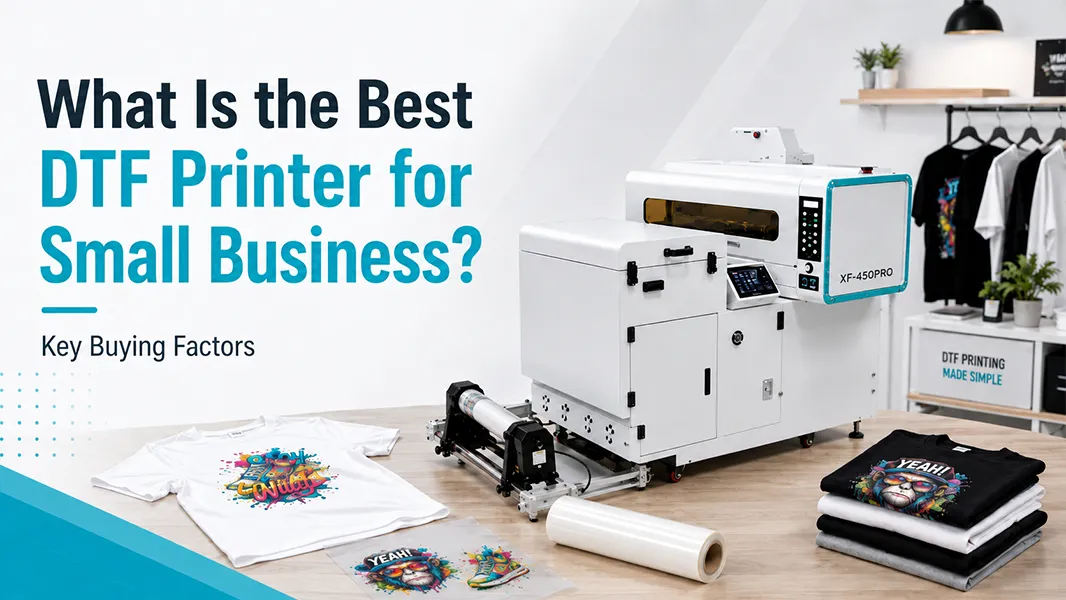
The Xin Flying XF-450PRO DTF Printer is a 16.5-inch all-in-one DTF configuration. Its published configuration includes a 42 cm print width and optional Epson printhead choices. That makes it worth considering for businesses that want to bring regular DTF transfer production in-house rather than outsource every run.
But it is not a universal recommendation. It makes the most sense when your business has a repeatable daily workflow, enough space for the full system, and an operator who can follow white-ink and maintenance procedures. For a fuller product-range comparison, read the DTF Printer Machine category and the DTF Printer for Shirts solution page.
A Simple Buying Decision Framework
Choose a compact or mid-width DTF configuration when you:
- Produce custom tees, hoodies, tote bags, uniforms, or mixed garment orders.
- Need multi-fabric flexibility.
- Want to print gang sheets for a varied order queue.
- Have a defined maintenance routine.
- Need a manageable workflow for one or two operators.
Consider a larger production setup when you:
- Run frequent high-volume jobs.
- Need wider gang sheets or larger output windows.
- Have dedicated production staff.
- Can support higher material throughput and stronger curing capacity.
- Need redundancy or room to scale quickly.
Questions to Ask Before You Place an Order
Use these questions with every prospective supplier:
- What does the full workflow include – printer, shaker, curing, take-up, RIP, and accessories?
- What is the recommended daily and weekly maintenance schedule?
- Can you show DTF samples on cotton, polyester, blends, and dark garments?
- Which consumables are recommended, and are they consistently available?
- What is the normal support process if a printhead, ink system, or RIP issue occurs?
- What training is provided before or after installation?
- What are the real space, power, and ventilation requirements for the full workflow?
- Can the machine output be matched to your normal order volume without creating a curing bottleneck?
FAQ: Best DTF Printer for Small Business
What size DTF printer is best for a small business?
A 16.5-inch format is often a practical fit for custom apparel businesses because it can handle common shirt graphics and gang sheets without the footprint of a larger production system. The right size depends on your order mix and expected daily output.
Should a small business buy an all-in-one DTF printer?
An all-in-one workflow can reduce material handling and simplify the process, especially in a compact space. It still requires proper maintenance, airflow planning, and an operator who understands the print-to-cure workflow.
Is DTF better than DTG for a small business?
Not automatically. DTF is often chosen for fabric flexibility and transfer production, while DTG can be a better fit for direct garment printing on suitable cotton-rich apparel. Choose based on your products, decoration style, and production model.
What is the biggest hidden cost in DTF printing?
Downtime and reprints. Maintenance discipline, consumable compatibility, support response, and workflow training usually have a bigger long-term impact than the headline purchase price.