Cuando una impresora DTF empieza a perder boquillas durante una semana de mucho trabajo, el coste va más allá de un ciclo de limpieza. La producción se ralentiza, los operarios tienen que detenerse para solucionar el problema, se desperdician materiales y los pedidos de los clientes pueden acumular retrasos.
El mantenimiento de las impresoras DTF combina cuatro responsabilidades: controlar el entorno de la sala de impresión, mantener la tinta blanca en movimiento, inspeccionar y limpiar las zonas de mantenimiento autorizadas, y seguir el procedimiento correcto de puesta en espera. Una rutina constante ayuda a prevenir atascos y paradas evitables, pero no sustituye a las instrucciones específicas de cada modelo ni al soporte técnico.
Esta guía ofrece a las pequeñas tiendas de ropa personalizada un plan de mantenimiento diario, semanal y mensual. Además, explica cómo el diseño de la impresora puede reducir la carga que supone el mantenimiento antes de que los problemas lleguen al cabezal de impresión.
Importante: Los procedimientos de mantenimiento varían según el modelo de impresora. Sigue siempre el manual de instrucciones y utiliza líquidos, materiales, ajustes y piezas de recambio homologados por el fabricante. Ponte en contacto con el servicio técnico antes de realizar un lavado forzado de los conductos de tinta, modificar los ajustes de presión, tocar la superficie de los inyectores o desmontar componentes del sistema de tinta.
Por qué las impresoras DTF necesitan un mantenimiento periódico
La impresión DTF depende de un flujo controlado de tinta a través de las pequeñas boquillas del cabezal de impresión. La tinta blanca requiere una atención especial, ya que su carga de pigmento tiende a sedimentarse más fácilmente que la de las tintas CMYK. Si la impresora permanece inactiva, la circulación es insuficiente o la tinta se seca alrededor de la estación de mantenimiento, el rendimiento de las boquillas puede verse reducido.
El suministro de tinta, la circulación, los filtros, la estación de taponado, el limpiador, el control de presión y las condiciones ambientales de la sala influyen todos en un mismo resultado: que la tinta llegue a unas boquillas limpias y correctamente selladas a un caudal estable.
Por eso, el mantenimiento de una impresora DTF va más allá de la limpieza del cabezal de impresión. Abarca la sala, el suministro de tinta, los componentes de taponado y limpieza, los sistemas de protección automáticos de la impresora y la rutina diaria del operador.
Fabricante de tintas industriales Kao Collins Señala que las boquillas obstruidas y las burbujas de aire son problemas habituales en la impresión DTF. Recomienda prestar atención diaria a la tinta blanca y seguir una rutina de limpieza aprobada por el fabricante, especialmente cuando la impresora funciona de forma intermitente.
Señales de alerta tempranas que no debes pasar por alto
Pequeños cambios en un patrón de prueba o en la capa base blanca pueden revelar un problema incipiente antes de que se produzca una parada de producción. Utiliza la siguiente tabla como guía de diagnóstico de primer nivel, no como sustituto del manual de tu impresora.
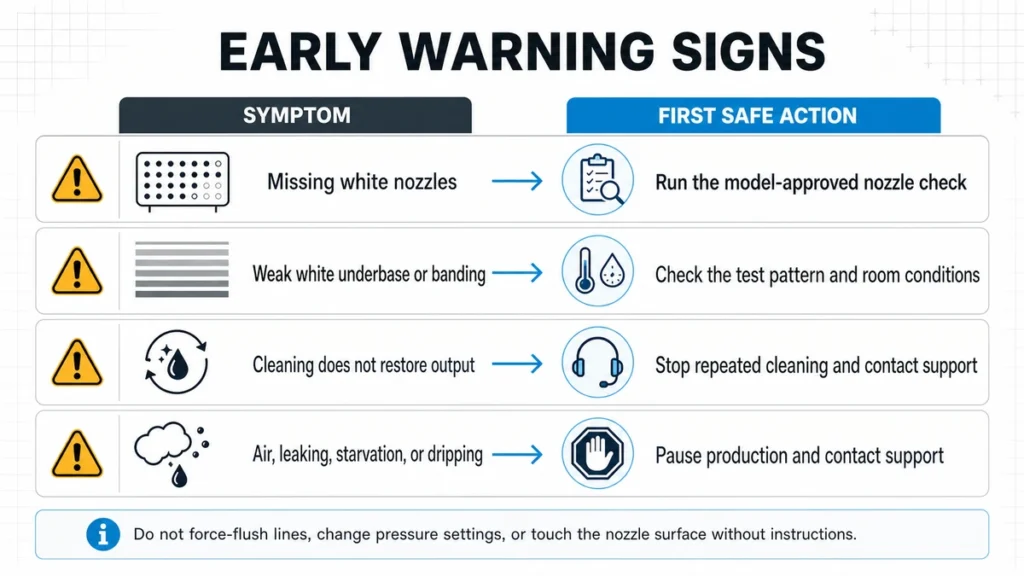
Señales de advertencia habituales del DTF y la primera medida de seguridad que hay que tomar antes de intentar una resolución de problemas más exhaustiva.
| Síntoma | Área que conviene comprobar | Primera medida de seguridad |
|---|---|---|
| Faltan boquillas blancas en la imagen de prueba | Flujo de tinta blanca, estado de las boquillas o restos de tinta seca alrededor de la estación de mantenimiento | Realizar la comprobación de las boquillas homologadas por el modelo e inspeccionar las zonas de mantenimiento homologadas |
| Rayas o una capa base blanca poco intensa | Desprendimiento de boquillas, inestabilidad en el flujo de tinta o condiciones inadecuadas en la sala | Comprueba la imagen de prueba, la temperatura y la humedad |
| Limpieza frecuente con escasos resultados | Estación de taponado, limpiador, regulador, filtro, aire en la tubería o una obstrucción más profunda | Deja de repetir los ciclos de limpieza y ponte en contacto con el servicio técnico |
| Se ve aire en una línea de tinta | Conexión del suministro de tinta, amortiguador, presión o junta | Sigue las instrucciones del manual y consulta al servicio técnico antes de purgar o ajustar la presión. |
| La tinta blanca se sedimenta de forma visible | Circulación o agitación insuficientes | Comprueba que el sistema de circulación funcione correctamente y sigue las instrucciones aprobadas para la manipulación de la tinta. |
| Acumulación o goteo de tinta | Problema con el tapón, la presión, el regulador o el suministro de tinta | Detén la producción y ponte en contacto con el servicio de asistencia antes de modificar la configuración |
| La pérdida de presión de la boquilla vuelve a producirse después de cada limpieza | Un problema sin resolver relacionado con el flujo de tinta, el sellado, el entorno o los componentes | Registra los resultados de las pruebas y remite el fallo recurrente a un nivel superior |
La falta de una boquilla no significa automáticamente que el cabezal de impresión haya fallado. Los síntomas recurrentes no deben tratarse con limpiezas intensivas y repetidas. Una limpieza excesiva consume tinta y puede ocultar la causa.
Lista de comprobación para el mantenimiento diario de la impresora DTF
Una rutina diaria práctica debe adaptarse al proceso de producción. Asigna cada comprobación a un operario y anota los problemas recurrentes para que el siguiente turno no tenga que empezar de cero.
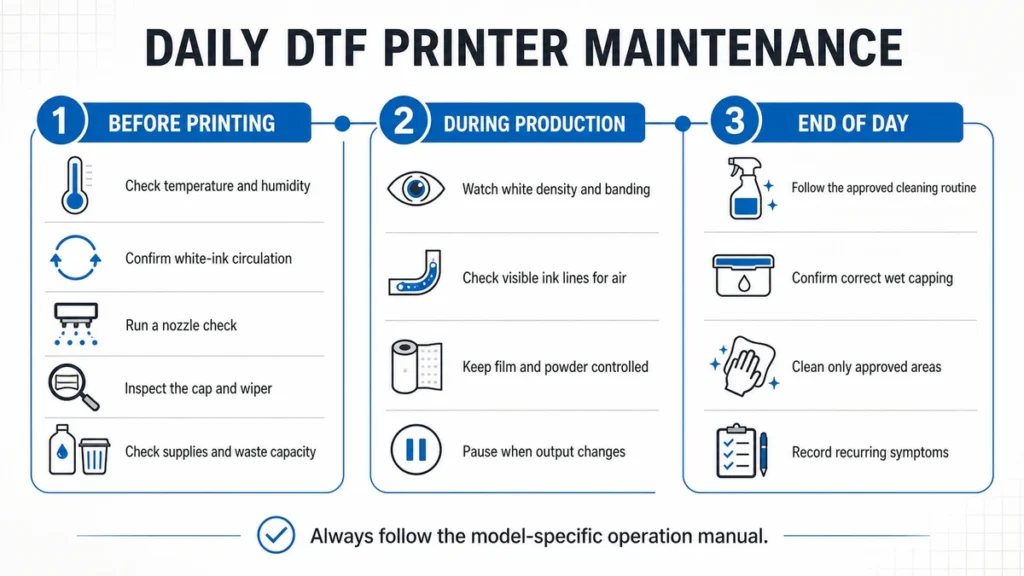
Un flujo de trabajo de mantenimiento diario para antes de la producción, durante la producción y al final de la jornada.
Antes de la producción
- Comprueba la temperatura y la humedad. Comprueba que la sala de impresión se encuentre dentro del rango especificado para tu impresora. Presta atención a los cambios que se producen durante la noche, al flujo directo del aire de la climatización, a los calefactores, a las puertas abiertas y a las condiciones meteorológicas inusualmente secas.
- Comprueba la circulación de la tinta blanca. Asegúrate de que el sistema de circulación automática esté en funcionamiento. Si tu modelo o las instrucciones de la tinta requieren una agitación manual, utiliza únicamente el método autorizado. Evita agitarla con fuerza, ya que esto introduce aire en la tinta.
- Realiza una comprobación de las boquillas. Imprime la plantilla de prueba aprobada por el fabricante antes de iniciar la producción para el cliente. Una plantilla nítida te sirve de referencia; si faltan líneas, debes investigar el problema antes de utilizar tinta, película y prendas en un encargo.
- Revisa la estación de taponado y el rascador. Comprueba que las zonas visibles autorizadas no presenten restos de tinta seca, residuos, daños ni problemas de estanqueidad. Límpialas únicamente con los materiales y el método especificados en el manual.
- Comprueba las existencias y la capacidad de residuos. Comprueba que la tinta, la película, el tóner, los materiales de limpieza y el sistema de residuos sean suficientes para los trabajos previstos. Una falta de material a mitad de un trabajo provoca paradas que se podrían evitar.
Durante la producción
Revisa las primeras copias de cada trabajo importante. Fíjate en lo siguiente:
- Cambios en la densidad del blanco.
- Nuevas bandas horizontales.
- Faltan detalles en el patrón de las boquillas.
- Falta de tinta o presencia de aire en las líneas visibles.
- Problemas con el seguimiento de la película.
- Entrada de polvo o partículas en las zonas cercanas a la impresora.
- Acumulación inusual de tinta, goteo o ruidos.
No esperes a que se imprima todo el rollo para comprobar si hay algún cambio visible. Una breve pausa controlada suele salir más barata que volver a imprimir un lote defectuoso.
Al final del día
Sigue el procedimiento de limpieza y aparcamiento homologado para el modelo. El cabezal de impresión debe volver a una estación de taponado limpia y formar el sellado que exige el sistema de espera de la máquina.
Antes de salir:
- Comprueba que el cabezal de impresión esté correctamente estacionado.
- Limpia únicamente las zonas autorizadas para tapar y limpiar.
- Elimina cualquier resto de película, polvo, suciedad y tinta que se pueda ver.
- Comprueba el sistema de desagüe.
- Mantén activada la alimentación de reserva si así lo indica el fabricante.
- Anota cualquier pérdida de boquillas, limpiezas repetidas u otros síntomas para el siguiente operario y el servicio técnico.
Mantenimiento semanal y mensual de la impresora DTF
El intervalo adecuado depende del volumen de impresión, el consumo de tinta, la limpieza de la sala y el diseño del modelo. Utiliza el siguiente calendario como guía para la planificación y, a continuación, compáralo con tu manual.
| Frecuencia | Enfoque de mantenimiento | Qué hay que comprobar |
|---|---|---|
| Todos los días de impresión | Entorno, circulación, patrón de pulverización, tapón y limpiador | Temperatura, humedad, movimiento de la tinta blanca, boquillas ausentes, residuos visibles, posición de reposo correcta |
| Semanal | Inspección más exhaustiva de las zonas accesibles para el operador | Sello de la tapa, estado del rascador, recorrido de la película, rodillos, sistema de residuos, líneas de tinta visibles, acumulación de polvo y residuos |
| Mensual o en función del consumo | Piezas de desgaste y estado del sistema de suministro de tinta | Filtros, reguladores, tapas, limpiaparabrisas, tubos, conexiones y otros elementos de mantenimiento que figuran en el manual |
| Antes de un largo periodo de inactividad | Preparación para el almacenamiento o el modo de espera | Procedimiento de apagado homologado, taponado en húmedo, limpieza de las superficies de sellado, requisitos relativos a la tinta o al líquido de almacenamiento |
Fija los intervalos de sustitución en función del manual, el estado de los componentes y la carga de trabajo real. Un taller que funcione en varios turnos desgastará las tapas de los cartuchos, las escobillas, los amortiguadores y los filtros más rápidamente que uno que imprima solo unos pocos trabajos a la semana.
Lleva un registro de mantenimiento sencillo con cuatro campos: fecha, resultado de la comprobación de boquillas, medidas tomadas y resultado. Esto facilita el diagnóstico a distancia de patrones recurrentes y te ayuda a distinguir entre un problema puntual de limpieza y un problema relacionado con un componente o con el suministro de tinta.
Cómo evitar que se obstruya la tinta blanca
Para evitar atascos de tinta blanca es necesario contar tanto con un sistema automático de protección de la impresora como con un mantenimiento constante por parte del operador. Ninguna de las dos partes puede suplir indefinidamente a la otra.
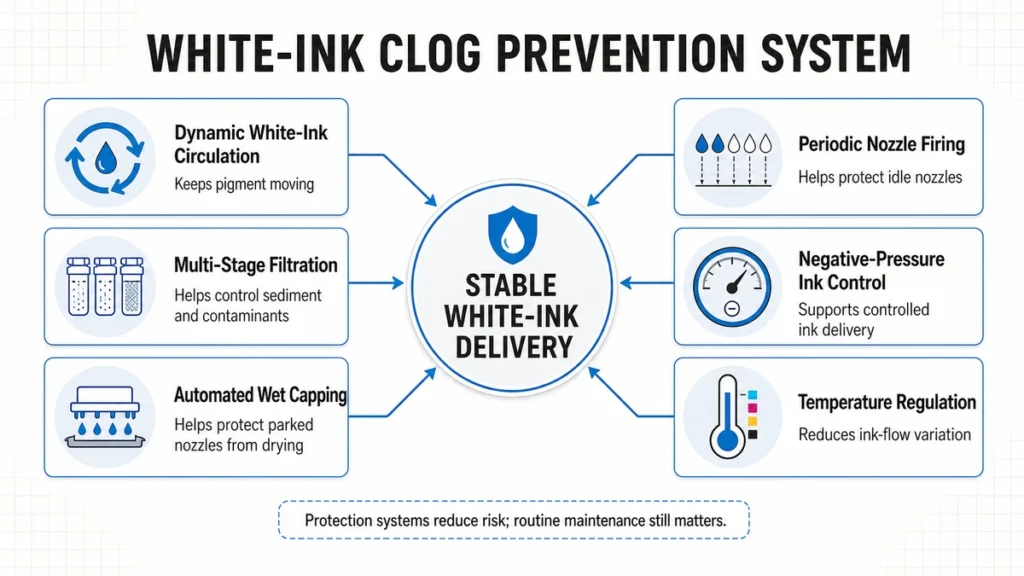
Seis funciones del sistema de impresión que ayudan a controlar los riesgos habituales de obstrucción con tinta blanca.
Mantén la tinta blanca en movimiento
La tinta blanca no debe permanecer estancada durante largos periodos de tiempo. La circulación dinámica mantiene el pigmento en movimiento a lo largo del tramo previsto del recorrido de la tinta. No obstante, el operario debe comprobar la circulación y seguir las instrucciones de almacenamiento y agitación del proveedor de la tinta.
Kao Collins aconseja prestar atención diaria a la tinta blanca y recomienda agitarla y realizar un proceso de limpieza automático antes de imprimir cuando el sistema solo se pone en marcha cada dos o tres días. El procedimiento exacto debe seguir las instrucciones del fabricante de la impresora y de la tinta.
Mantén los contaminantes fuera del recorrido de la tinta
La filtración ayuda a evitar que los sedimentos y los contaminantes lleguen a los componentes sensibles del sistema de suministro de tinta. Los filtros son elementos de mantenimiento, no piezas permanentes. Un filtro obstruido o que haya superado su vida útil puede restringir el caudal, mientras que un recambio inadecuado puede alterar el funcionamiento del sistema.
Utiliza tinta compatible y dentro de la fecha de caducidad, y mantén los envases bien cerrados. No mezcles sistemas de tinta a menos que el fabricante de la impresora apruebe dicha combinación.
Mantén un sellado fiable
La estación de taponado ayuda a proteger el cabezal de impresión mientras el carro está en reposo. La tinta seca o los daños alrededor de la tapa pueden debilitar el sellado, lo que permite que la zona de los inyectores se seque durante los periodos de inactividad.
El sellado húmedo automatizado sigue dependiendo de que la tapa esté limpia y correctamente alineada. La activación periódica de las boquillas puede ayudar a evitar que la tinta se seque en las boquillas inactivas, pero no puede corregir una tapa dañada, un entorno inadecuado, tinta contaminada o piezas de recambio desgastadas.
Control del suministro de tinta
El control de la presión negativa garantiza un suministro estable de tinta en el cabezal de impresión. Las fugas de aire, los filtros obstruidos, los amortiguadores desgastados, los ajustes incorrectos o una temperatura inestable pueden alterar ese equilibrio.
Los ajustes de presión no deben convertirse en un experimento por parte del operador. Si la tinta se agota, gotea o se comporta de forma irregular, documenta el síntoma y ponte en contacto con el servicio técnico antes de modificar los valores calibrados.
Control de la temperatura y la humedad
Las condiciones del local influyen en el proceso de secado, el rendimiento de las boquillas, la electricidad estática y la uniformidad de la impresión. Un entorno limpio y estable forma parte del sistema de impresión.
En el caso de las impresoras DTF de Xinflying, el rango de funcionamiento confirmado es el siguiente:
- Temperatura: 20–30 °C (68–86 °F)
- Humedad relativa: 45%–65% RH
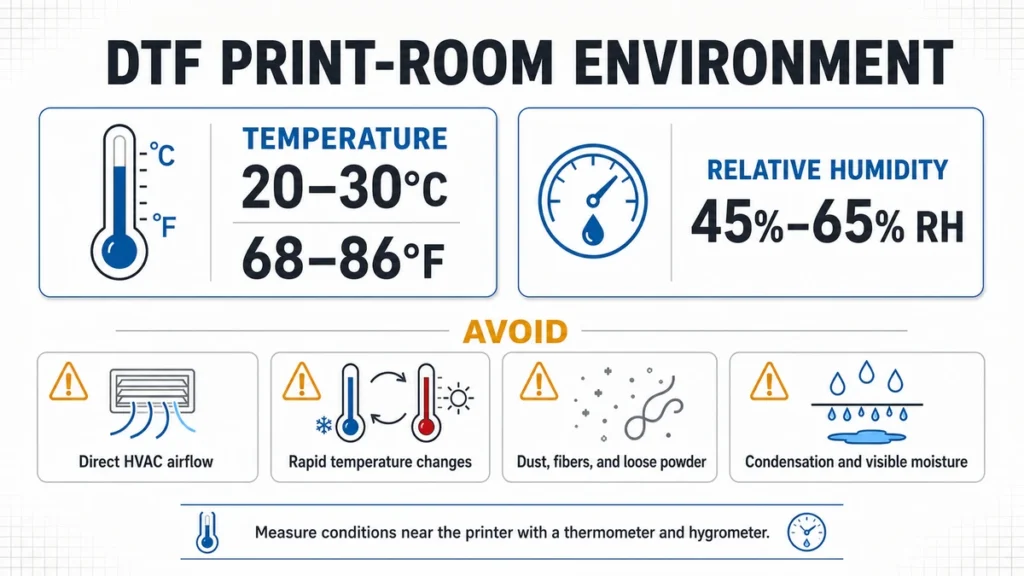
Entorno operativo confirmado para las impresoras DTF de Xinflying y riesgos habituales relacionados con las condiciones ambientales que deben evitarse.
Coloca un termómetro y un higrómetro digitales cerca de la impresora, lejos de la salida de un humidificador o del flujo directo del sistema de climatización. Mide el aire que rodea al equipo, no el del lado opuesto de la habitación.
Evita:
- El flujo de aire directo procedente de aparatos de aire acondicionado, calefactores o ventiladores.
- Cambios bruscos de temperatura entre turnos.
- Baja humedad cerca del cabezal de impresión.
- Condensación o humedad visible.
- Polvo, fibras textiles y polvos sueltos cerca de las zonas abiertas de las impresoras.
Roland DGA Además, explica que la temperatura y la humedad pueden afectar al rendimiento de las boquillas DTF y recomienda utilizar un higrómetro. Los valores publicados corresponden a un modelo de Roland, no a los equipos de Xinflying. Utiliza siempre el rango especificado para tu impresora.
Qué hacer si el cabezal de impresión ya está obstruido
Si la comprobación de la boquilla revela una obstrucción, empieza por la medida menos invasiva aprobada para ese modelo. El objetivo es diagnosticar la causa sin provocar un segundo problema.
- Suspender la producción de un cliente. No continúes imprimiendo un trabajo si el patrón de blanco ha fallado o si presenta bandas muy marcadas.
- Realiza y guarda una comprobación de boquillas.** Haz una foto o graba el patrón para que el servicio técnico pueda ver qué canales están afectados.
- Revisa la habitación y las zonas de mantenimiento visibles. Comprueba la temperatura, la humedad, la circulación de la tinta blanca, el nivel de tinta, el estado de los tapones, el estado de los limpiadores y si hay aire o fugas visibles.
- Ejecuta un ciclo de limpieza homologado por el fabricante. Utiliza el nivel de limpieza y el tiempo de espera especificados para el modelo.
- Realiza otra comprobación de las boquillas.** Compárala con el primer patrón. Fíjate si siguen faltando las mismas boquillas, si el resultado mejora o si el problema empeora.
- Notifique los síntomas persistentes.** Póngase en contacto con el servicio técnico cuando el ciclo de limpieza aprobado no restablezca el patrón, cuando se observe salida de aire o fugas, o cuando el mismo problema siga repitiéndose.
Evita realizar limpiezas intensivas repetidas, utilizar disolventes no autorizados, raspar la placa de boquillas, realizar lavados a presión en las tuberías o modificar la presión negativa sin seguir las instrucciones. Estas acciones pueden provocar un mayor consumo de tinta, dañar componentes, introducir aire o dificultar el diagnóstico remoto.
Mantenimiento durante los fines de semana, los días festivos y los largos periodos de inactividad
Una impresora DTF no se puede apagar y dejar sin usar durante semanas, como una impresora láser de oficina. La tinta blanca puede sedimentarse, las superficies de mantenimiento pueden secarse y las condiciones ambientales pueden cambiar mientras el taller está cerrado.
Para un fin de semana normal, sigue el procedimiento de apagado o de modo de espera que figura en el manual. Comprueba que el cabezal de impresión esté tapado y que sigan estando disponibles todas las funciones necesarias de circulación, tapado en húmedo o protección de boquillas.
Antes de unas vacaciones largas:
- Limpia las zonas autorizadas para el taponado y el frotado.
- Confirma que el entorno en espera se mantendrá dentro del rango especificado.
- Comprueba que la potencia necesaria se mantenga estable.
- Sigue las instrucciones del fabricante sobre el manejo y el almacenamiento de la tinta.
- Ponte en contacto con el servicio técnico antes de purgar el sistema o sustituir la tinta por líquido de conservación.
Al reiniciar, revisa la sala, comprueba la circulación del aire y realiza una prueba de boquillas antes de cargar el trabajo de un cliente.
Características de las impresoras que pueden reducir la carga de mantenimiento
El mantenimiento diario sigue siendo importante, pero el diseño del equipo determina el nivel de protección que ofrece la impresora entre las revisiones del operador. Los compradores preocupados por los atascos recurrentes deberían evaluar el sistema completo de gestión de la tinta y de asistencia técnica, y no solo la velocidad y el precio de compra.
| Características de la impresora | Problema de mantenimiento que aborda | Lo que debe comprobar un comprador |
|---|---|---|
| Circulación dinámica de tinta blanca | Sedimentación del pigmento durante el funcionamiento y los periodos de inactividad | ¿Qué partes del recorrido de la tinta están sometidas a circulación y cuándo se produce dicha circulación? |
| Filtración en varias etapas | Sedimentos o contaminantes que se desplazan hacia componentes sensibles | Filtrar ubicaciones, especificaciones, disponibilidad y acceso a recambios |
| Taponado en húmedo automatizado | Secado de la zona de la boquilla mientras el vehículo está aparcado | Cómo se mantiene el precinto y cómo se inspecciona el tapón |
| Disparo periódico de las toberas | Secado de la tinta en las boquillas inactivas | Si el proceso es automático y cómo funciona en modo de espera |
| Control de tinta por presión negativa | Falta de tinta, goteo y suministro inestable de tinta | Cómo se controla la presión y cuándo el personal de apoyo debe ajustarla |
| Regulación de la temperatura | Cambios en el flujo de tinta provocados por las variaciones de temperatura | ¿Qué parte del sistema de tinta está regulada? |
| Diagnóstico a distancia | Largos retrasos en la resolución de problemas | Horario de atención, procedimiento de respuesta e información de diagnóstico necesaria |
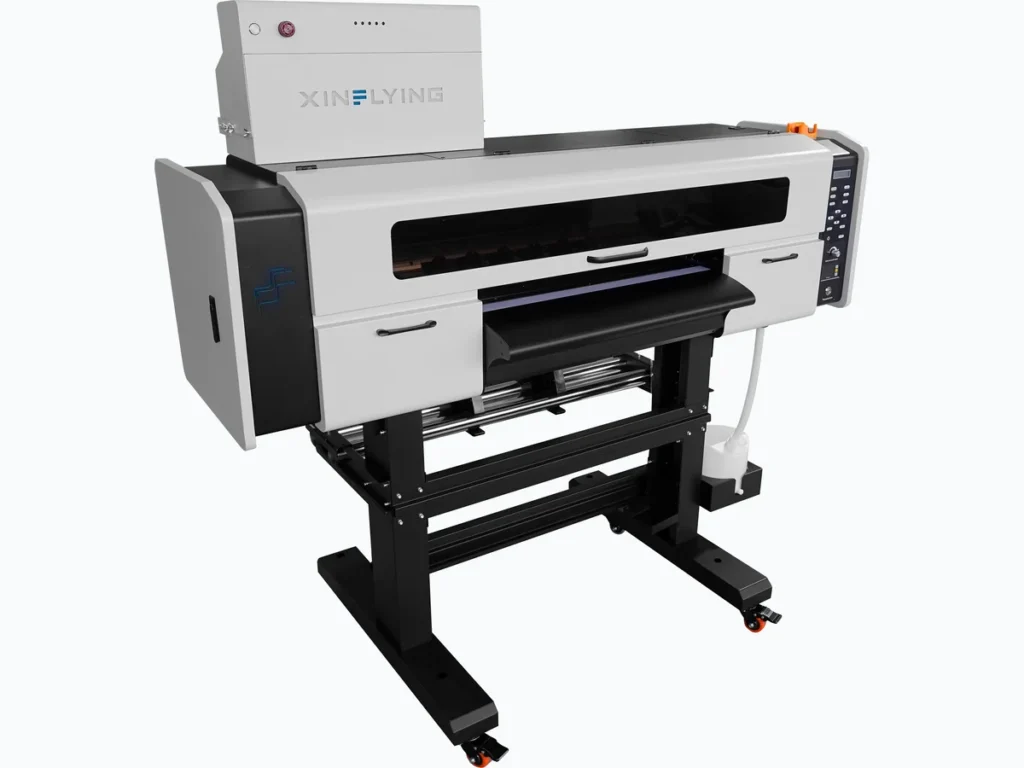
Una configuración representativa de una impresora DTF de Xinflying. Los modelos disponibles varían en función del ancho de impresión y de los requisitos de producción.
A través de Xinflying Gama de impresoras DTF, estos aspectos se abordan mediante una circulación dinámica de tinta blanca con filtración en varias etapas, el taponado automático en húmedo y la activación periódica de las boquillas, el control de la tinta mediante presión negativa y la regulación de la temperatura.
Estos sistemas están diseñados para reducir los riesgos habituales de mantenimiento; no significan que la impresora no requiera mantenimiento. Xinflying también ofrece manuales de uso en inglés, asistencia técnica 24 horas al día, 7 días a la semana, diagnóstico remoto y servicio técnico local en EE. UU. para problemas que vayan más allá del mantenimiento habitual que realiza el operador.
Si todavía estás comparando configuraciones, consulta esta sección de mantenimiento junto con una guía más amplia Guía de compra de impresoras DTF. El ancho de impresión y la velocidad de paso son importantes, pero también lo son el acceso al servicio técnico, la disponibilidad de consumibles, la protección automatizada, la formación y el servicio de asistencia tras la instalación.
El verdadero coste de un mantenimiento deficiente
El mantenimiento de una impresora DTF cuesta más que el líquido de limpieza o una escobilla de recambio. Un cálculo útil debe tener en cuenta todo aquello que se ve interrumpido por el problema.
Sigue estas categorías:
- Tiempo dedicado por el operario a la limpieza y al diagnóstico.
- Tintas de limpieza y consumibles de mantenimiento.
- Película, tóner, tinta y impresiones de prueba desperdiciadas.
- Prendas reimpresas o con transferencias.
- Filtros de recambio, reguladores, tapas, limpiaparabrisas y cabezales de impresión.
- Horas de producción perdidas mientras la máquina no está disponible.
- Margen de contribución que se pierde cuando un pedido se retrasa, se cancela o se subcontrata.
Una fórmula sencilla para la planificación es:
Impacto mensual del mantenimiento = mano de obra de mantenimiento + materiales desperdiciados + piezas de recambio + pérdida por tiempo de inactividad
Se trata de una herramienta de planificación, no de un cálculo del retorno de la inversión (ROI) garantizado. Utiliza tu tarifa de mano de obra, los costes de material, el historial de sustituciones y el margen de contribución medio para comparar tu impresora actual con la que se propone como sustituta.
Para los talleres que fabrican Hojas de tirada DTF o al ejecutar órdenes de transferencia repetidas, incluso una parada breve puede afectar a varios diseños de clientes a la vez. Por eso, la estabilidad del funcionamiento, el acceso a las piezas de recambio y la asistencia técnica oportuna son factores que influyen en la decisión de compra.
Preguntas frecuentes
Las impresoras DTF requieren un mantenimiento constante, ya que la tinta blanca se sedimenta con mayor facilidad que la tinta CMYK y el cabezal de impresión depende de un flujo controlado y de un sellado fiable de la tapa. Las comprobaciones diarias suelen ser breves cuando la sala, el sistema de circulación, las piezas de recambio y la rutina del operador funcionan correctamente. La falta de mantenimiento convierte las pequeñas tareas en procesos más largos de resolución de problemas y reparaciones.
Comprueba las condiciones de la sala, el sistema de tinta blanca, el patrón de boquillas, la estación de taponado y el limpiador cada día de impresión. Realiza una inspección más exhaustiva semanalmente e inspecciona las piezas de desgaste mensualmente o en función del uso. El manual del modelo debe especificar el método de limpieza exacto, los materiales autorizados, el acceso para el mantenimiento y los intervalos de sustitución.
La tinta blanca DTF puede obstruirse cuando el pigmento se deposita, la tinta se seca cerca de las boquillas, entra aire en el conducto de la tinta, los filtros o reguladores restringen el flujo, la tapa no sella correctamente o la impresora permanece inactiva en condiciones inadecuadas. La circulación, la filtración, el sellado en húmedo, la activación periódica de las boquillas, una presión estable y las comprobaciones por parte del operador ayudan a controlar estos riesgos.
No dejes una impresora DTF sin utilizar durante una semana sin seguir el procedimiento de modo de espera o almacenamiento. Es posible que la máquina necesite alimentación eléctrica para la circulación automática o la protección de las boquillas. Limpia las zonas indicadas, mantén las condiciones ambientales requeridas y ponte en contacto con el servicio de asistencia antes de realizar un lavado o almacenamiento a largo plazo.
Sigue el rango especificado por el fabricante de tu impresora. Las impresoras DTF de Xinflying están diseñadas para funcionar a una temperatura de entre 20 y 30 °C (68–86 °F) y una humedad relativa de entre 45% y 65%. Controla las condiciones en las inmediaciones de la impresora con un termómetro y un higrómetro, y evita el flujo directo de aire de los sistemas de climatización, el exceso de polvo, la condensación y los cambios bruscos de temperatura.
Ponte en contacto con el servicio técnico cuando un ciclo de limpieza homologado no restablezca el patrón de impresión de las boquillas, las mismas boquillas fallen repetidamente, se observe aire o fugas, la tinta no salga o gotee, o la impresora requiera ajustes de presión o del sistema de tinta. Realizar limpiezas intensivas repetidamente sin identificar la causa supone un desperdicio de tinta y puede retrasar la reparación adecuada.
Ten en cuenta el mantenimiento a la hora de elegir una impresora
Un flujo de trabajo DTF fiable combina una sala controlada, hábitos constantes por parte de los operarios, sistemas de impresión con protección, consumibles compatibles y un servicio de asistencia ágil. Si falla uno de estos elementos, es más probable que un pequeño problema de mantenimiento se convierta en un parón de la producción.
Xinflying fabrica impresoras DTF con diferentes configuraciones para distintos anchos de impresión y requisitos de producción, con el respaldo de una completa DTF suministra, documentación en inglés, diagnóstico remoto, asistencia técnica las 24 horas del día, los 7 días de la semana, y servicio técnico local en Estados Unidos.
Solicitar un Impresora DTF cita y recibirás una recomendación de configuración basada en lo que imprimes, el volumen previsto y tus necesidades de mantenimiento y asistencia técnica.