Introduction
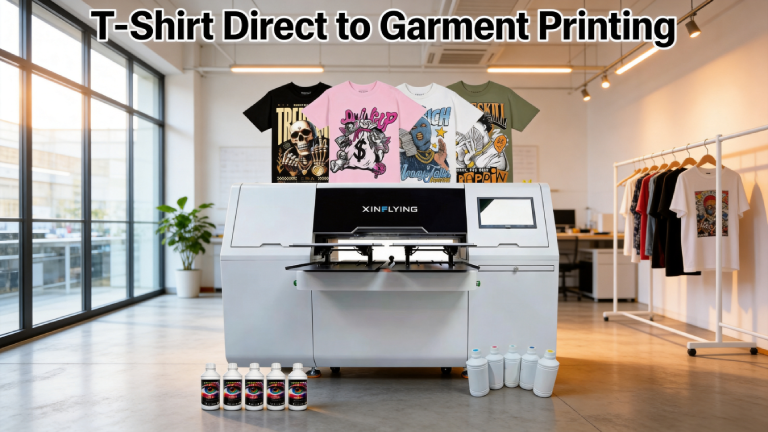
T-shirt direct to garment printing — commonly known as DTG printing — has transformed the custom apparel industry. Unlike traditional methods that require screens, films, or transfer paper, DTG technology prints designs directly onto fabric with inkjet-style precision. The result is vibrant, full-color prints with incredible detail, even on complex photographic images.
Whether you are a small business owner launching a merch line, a print shop expanding your services, or an entrepreneur exploring print-on-demand, understanding how DTG printing works is essential to making smarter decisions. This guide covers everything you need to know.
What Is Direct to Garment (DTG) Printing?
Direct to garment printing is a digital printing method that uses specialized inkjet technology to apply water-based inks directly onto textile surfaces. The printer operates similarly to a desktop inkjet printer — but instead of paper, the print head moves over a garment laid flat on a platen.
DTG printers use CMYK (cyan, magenta, yellow, black) ink channels, often supplemented by white ink, which allows printing on both light and dark-colored garments. A pretreatment process is typically applied before printing on dark fabrics to help the ink bond and produce vivid colors.
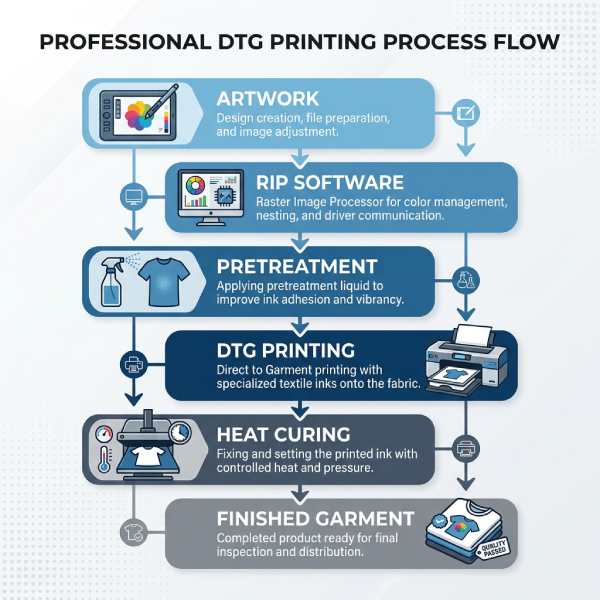
How the DTG Printing Process Works
Step 1: Pretreatment
For dark or colored garments, a pretreatment solution is applied to the fabric to prepare the fibers for ink adhesion. This step is critical for achieving bright, durable prints on non-white fabrics. Light-colored garments can often skip this step.
Step 2: Loading the Garment
The t-shirt is stretched flat and secured onto the printer platen. Proper loading ensures consistent print placement and prevents smearing during the print cycle.
Step 3: Printing
The DTG printer sprays ink directly onto the garment surface. The print head passes back and forth across the fabric, depositing microscopic droplets of ink with high precision. High-resolution prints typically take two to five minutes per garment.
Step 4: Curing
After printing, the garment is passed through a heat press or tunnel dryer to cure the ink. Curing bonds the ink to the fabric fibers, ensuring washability and durability. Proper curing temperature and dwell time are critical to print longevity.
Best Fabrics for DTG T-Shirt Printing
DTG printing works best on natural fibers, particularly cotton. Here is a quick overview of fabric compatibility:
- 100% cotton — ideal, produces the most vibrant and durable results
- Cotton-polyester blends (50/50) — good results, some color vibrancy trade-off
- Tri-blends (cotton/polyester/rayon) — acceptable, test pretreatment carefully
- 100% polyester — not recommended for DTG; consider sublimation or DTF instead
- Dark fabrics — require pretreatment for white ink base layer
Ring-spun and combed cotton garments produce the smoothest print surface, which translates directly to sharper, more detailed prints.
DTG vs. Other T-Shirt Printing Methods
DTG printing excels in certain scenarios but is not always the best fit for every order. Here is how it compares:
- Small runs and one-offs: DTG is most cost-effective for short runs since there are no setup costs or screens to prepare
- Full-color photographic prints: DTG handles unlimited colors with ease
- Bulk orders: Screen printing typically becomes more cost-efficient above 50–100 units
- Synthetic fabrics: DTF (Direct to Film) printing is often a better choice for polyester-heavy garments
Choosing the Right DTG Printer for Your Business
Selecting a DTG printer is a major investment. Key factors to evaluate include:
- Print speed and throughput — how many shirts per hour at full resolution?
- White ink system reliability — white ink clogging is a common challenge in DTG
- Platen size and garment compatibility — can it print adult XL and oversized items?
- Ink cost per print — factor this into your profitability calculations
- After-sales support — firmware updates, technical support, and spare part availability
Xinflying offers a range of industrial-grade DTG and hybrid printing equipment designed for production environments, with robust white ink management systems and high-throughput platens. Contact our team to learn which model fits your production volume.
Tips for Best DTG Print Quality
- Use high-resolution artwork (300 DPI minimum) for sharp detail
- Ensure proper pretreatment application — uneven pretreatment causes patchy prints
- Calibrate your heat press temperature and pressure regularly
- Perform test prints on each new garment brand or color
- Maintain print heads through regular cleaning cycles to prevent clogging
FAQ: T-Shirt Direct to Garment Printing
Q1: How durable are DTG prints on t-shirts?
DTG prints on properly pretreated and cured 100% cotton garments can last 40–60+ wash cycles when cared for correctly. Washing garments inside-out in cold water on a gentle cycle extends print life significantly.
Q2: Can DTG print on dark t-shirts?
Yes. DTG printers with white ink capability can print on dark garments by first laying down a white ink underbase. Pretreatment is essential for this process to work correctly.
Q3: What is the minimum order quantity for DTG?
One of DTG’s greatest strengths is that there is no minimum order quantity. You can profitably print a single shirt, making it ideal for on-demand fulfillment and customization businesses.
Q4: How long does a DTG print take?
Print time varies by design complexity, garment size, and resolution settings. A standard front chest print on a light garment typically takes two to four minutes. Dark garment prints with a white underbase may take four to seven minutes.
Q5: Is DTG printing profitable?
DTG can be highly profitable, particularly for custom, on-demand, and short-run orders. Profitability depends on equipment cost, ink consumption, garment blanks pricing, and your sales price per unit. Higher-throughput machines reduce the per-unit cost at scale.
Q6: What file formats work best for DTG printing?
PNG files with transparent backgrounds are ideal for DTG printing. High-resolution PSD, TIFF, and PDF files are also commonly accepted. Avoid low-resolution JPEGs for detailed or photographic prints.