
Shutdown Maintenance (Over 15 Days)
Select Your Printer Model
(Default: Universal)
Choose your model from the drop-down menu below.
XINFLYING Shutdown Maintenance (Over 15 Days)
Applicable Model: Universal
Video Tutorial
Drain and flush the ink system, protect the printheads from drying, and disconnect the printer before a shutdown lasting more than 15 days.
Applicable model: General. Required items: syringe, clean containers, compatible flushing water, plastic wrap, approved printhead moisturizing liquid, and suitable cleaning materials.
Step 1. Drain and Flush the Ink Lines
1.1 Switch off and unplug the printer. Remove the carriage cover and protect the ribbon cable connections from ink or water (See Figure 1.1, left).
1.2 Remove the remaining ink from the reservoirs. Detach the dampers from the printheads while preserving their tube connections and positions. Use a syringe at the damper outlets to draw out the remaining ink (See Figure 1.1, right).
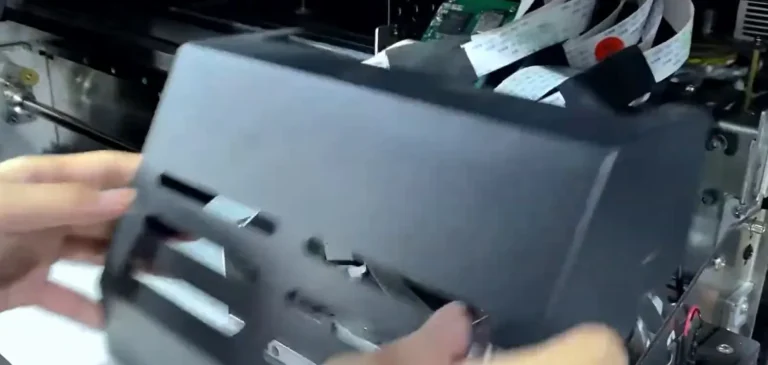

1.3 Add water to the reservoirs only where compatible with the installed ink system. Draw it through the ink tubes using the syringe at the detached damper outlets until the lines are clean.
Step 2. Keep the Printheads Moist
2.1 Place clean plastic wrap over the cap tops and add approved printhead moisturizing liquid onto the wrap. Keep the liquid away from the ribbon cable connections.
2.2 Return the carriage to its home position so the nozzle surfaces remain over the moist protective layer (See Figure 2.1).

Step 3. Complete the Shutdown
3.1 Empty and clean the waste ink bottle, then restore its tube connection.
3.2 With the power off, inspect the power cable and printhead ribbon cables for visible damage or liquid contamination. Keep the electrical connections dry.
3.3 Switch off the printer and unplug its power cord before leaving it for the extended shutdown.
If you are not sure about any step, please contact the XINFLYING Technical Support Team for assistance.
© 2026 XINFLYING Technical Team. All rights reserved.
Do not reproduce or modify this document without permission.
For support, please contact: [email protected] | www.xin-flying.com