
Control Panel Operation Guide
Select Your Printer Model
(Default: T604 DTF Printer)
Choose your model from the drop-down menu below.
XINFLYING Control Panel Operation Guide
Applicable Model: XINFLYING T604 DTF Printer
Video Tutorial
Step 1. Printhead Cleaning and Testing
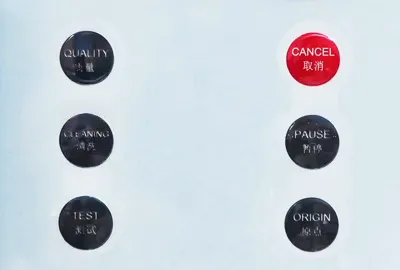
1.1 Press CLEANING to run automatic printhead cleaning. This button is in the left column, directly above TEST (See Figure 1.1).
1.2 Press TEST to print a nozzle test. This is the bottom button in the left column shown below (See Figure 1.1).
Step 2. Cancel or Pause Printing
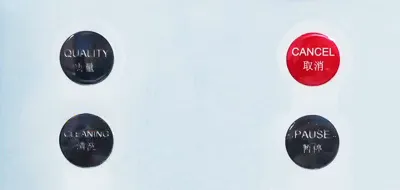
2.1 Press the red CANCEL button to stop printing the current pattern when you do not want to continue (See Figure 2.1).
2.2 Press PAUSE to pause printing. This button is directly below CANCEL (See Figure 2.1).
Step 3. Use Menu Navigation
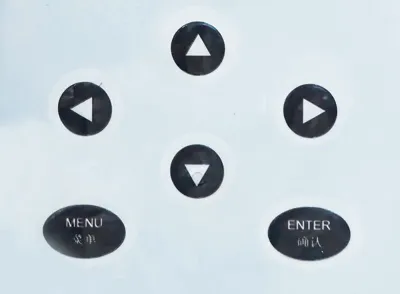
3.1 Press MENU to display the menu. This button is at the lower left of the navigation controls (See Figure 3.1).
3.2 Use the Up, Down, Left, and Right arrow buttons to select functions (See Figure 3.1).
3.3 Press ENTER to confirm your selection. This button is at the lower right of the navigation controls (See Figure 3.1).
Control Reference
Button | Function |
CLEANING | Run automatic printhead cleaning. |
TEST | Print a nozzle test. |
CANCEL | Stop printing the current pattern. |
PAUSE | Pause printing. |
Direction buttons | Select functions. |
MENU | Display the menu. |
ENTER | Confirm the selection. |
If you are not sure about any step, please contact the XINFLYING Technical Support Team for assistance.
© 2026 XINFLYING Technical Team. All rights reserved.
Do not reproduce or modify this document without permission.
For support, please contact: [email protected] | www.xin-flying.com