
Clean Encoder Strip
Select Your Printer Model
(Default: T604 DTF Printer)
Choose your model from the drop-down menu below.
XINFLYING Clean Encoder Strip
Applicable Model: XINFLYING T604 DTF Printer
Video Tutorial
Clean the encoder strip with an alcohol-moistened dust-free cloth to remove surface residue.
Applicable model: T604. Required items: dust-free cloth and alcohol spray.
Step 1. Prepare the Cloth
1.1 Open the service cover for access and switch off the printer before manually wiping components.
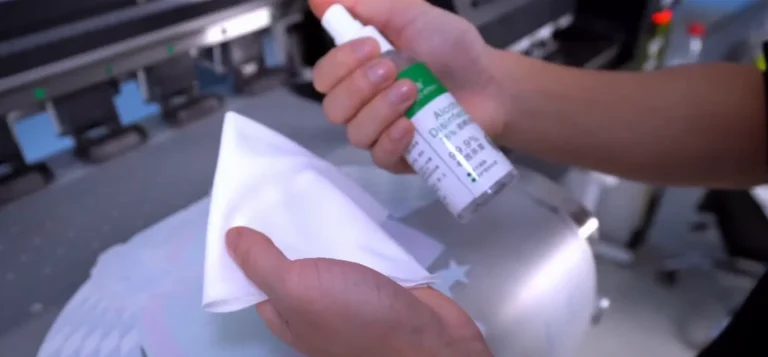
1.2 Spray alcohol onto the dust-free cloth to moisten it before wiping (See Figure 1.1).
Step 2. Clean the Encoder Strip
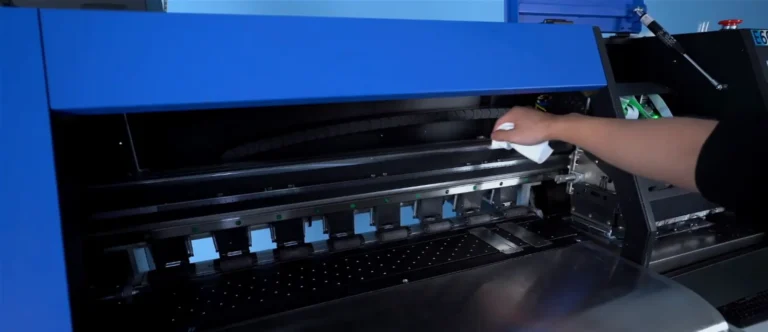
2.1 Locate the encoder strip along the carriage travel area. Gently wipe the strip with the prepared cloth, supporting it without bending or pulling it out of position (See Figure 2.1).
If you are not sure about any step, please contact the XINFLYING Technical Support Team for assistance.
© 2026 XINFLYING Technical Team. All rights reserved.
Do not reproduce or modify this document without permission.
For support, please contact: [email protected] | www.xin-flying.com