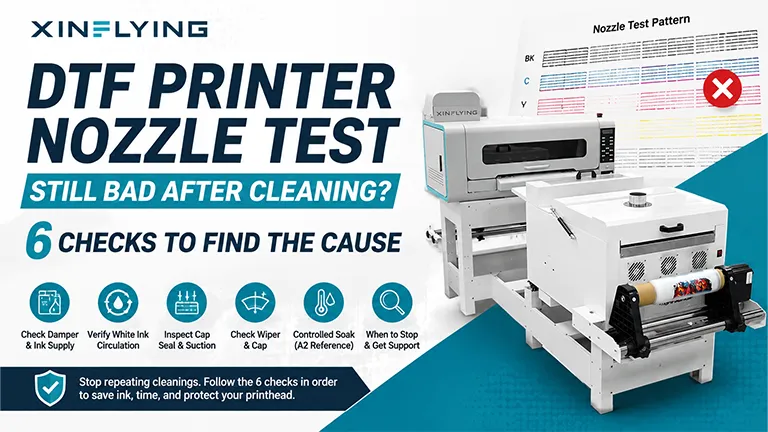
If a DTF printer can draw ink through the printhead but the nozzle test remains incomplete after one or more cleaning cycles, stop repeating automatic cleanings and check the ink path, white ink circulation, capping seal, wiper, and printhead condition in that order. Repeated cleaning without finding the cause can waste ink and may not correct an air leak, poor cap seal, or physical blockage.
The workflow below applies broadly to roll-fed DTF printers, but component locations and service limits vary. Any measurements identified as A2-specific come from the XINFLYING A2 All-in-One Printer FAQ and should not be applied to another model without its manual or confirmation from technical support.
What an Incomplete Nozzle Test Can Tell You
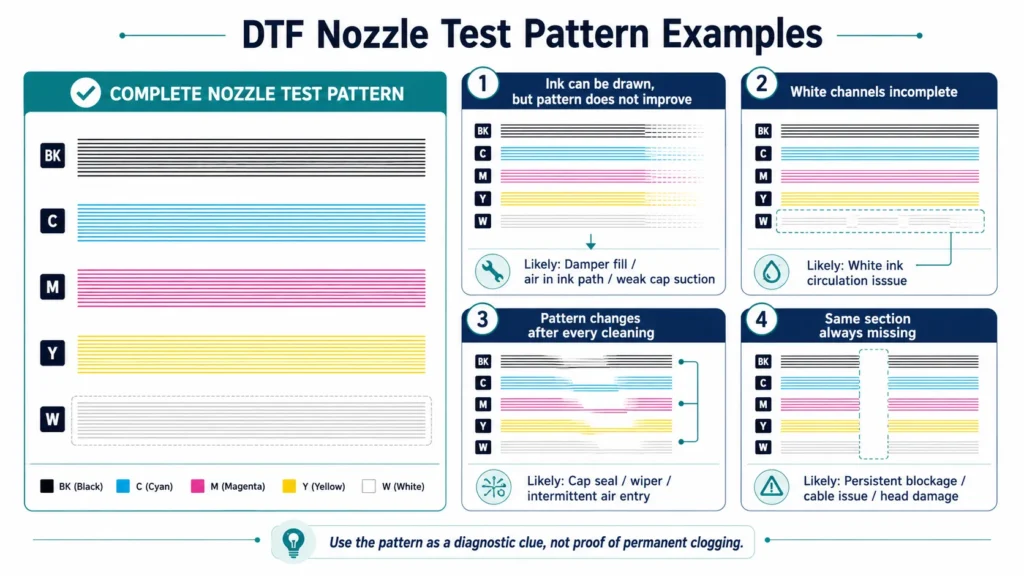
A nozzle test is a diagnostic pattern. Missing lines can point to several different conditions, so the pattern alone does not prove that the printhead is permanently clogged
| What you observe | A likely area to inspect first |
|---|---|
| Ink can be drawn, but the pattern does not improve | Damper fill level, air in the ink path, or weak capping-station suction |
| White channels are incomplete | White ink supply and circulation status |
| The pattern changes after every cleaning | Cap seal, wiper condition, or intermittent air entry |
| The same section remains missing | A persistent blockage, cable/channel issue, or printhead damage |
| No ink can be drawn at all | The cap, pump, tubing, damper, or a severe blockage; use a no-suction diagnostic workflow |
Before opening covers, pause the printer according to its operating instructions. Power the machine off before touching cables or moving parts. Do not hot-plug printhead cables, force liquid through a printhead, or use an unapproved cleaning fluid.
1. Check the Damper and Ink Supply
Start upstream of the printhead. Confirm that the correct ink is available, the supply line is not pinched, and the damper is not nearly empty. A low damper can introduce air and make cleaning inconsistent even when some ink can still be drawn.
For the XINFLYING A2, the supplied FAQ instructs the technician to draw ink into the damper until it is more than half full. Treat that fill level as model-specific. Other XINFLYING printers may use a different damper, pressure system, or ink-delivery arrangement.
After correcting the supply condition, run one nozzle test. Avoid using repeated cleaning cycles as a substitute for inspection.
2. Verify White Ink Circulation Status
White pigment can settle, which is why many DTF systems include circulation or agitation. Confirm that the system is operating in the mode specified for your printer.
The A2 FAQ specifically says to check whether white ink circulation has been enabled when the white nozzle pattern is incomplete, and it states that circulation should not be switched on while that machine is working. Because control logic differs across models, do not assume the same switch behavior applies to every printer. Follow the label on the machine or ask support for the correct operating state.
3. Inspect the Capping-Station Seal and Cleaning Motion
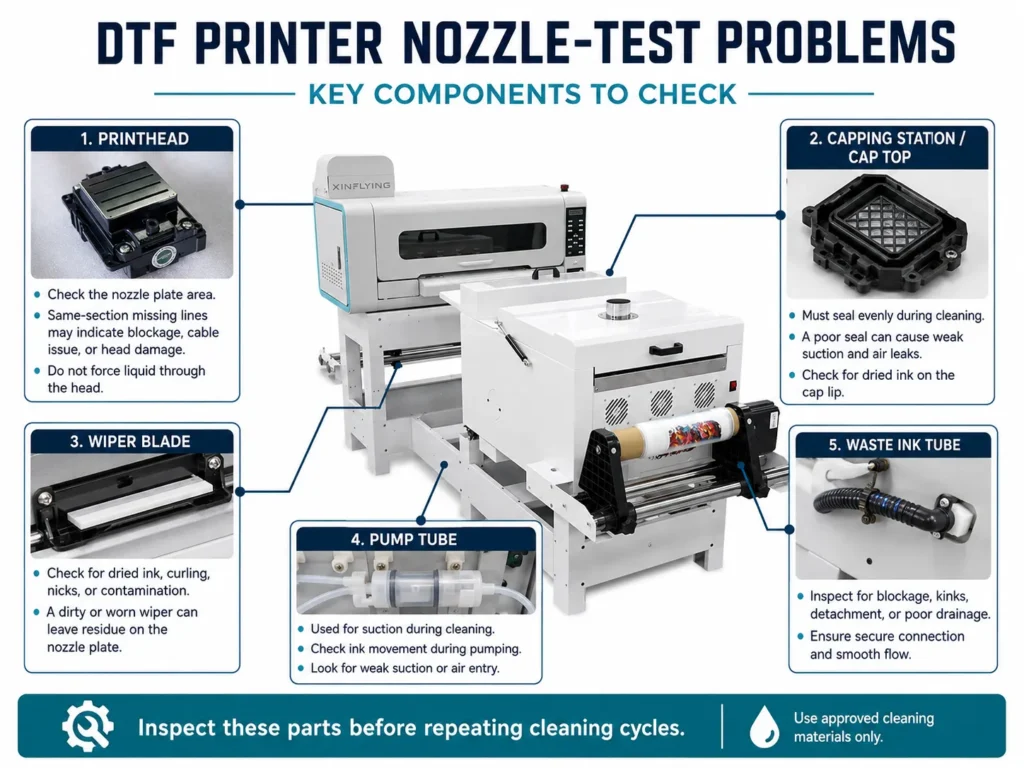
he cap must align with the printhead and seal evenly during ink extraction. If the cap sits too low, is offset, or has hardened residue around its edge, the pump may draw air instead of pulling ink uniformly through the nozzles.
Observe a normal cleaning cycle without placing hands near the carriage. Check that:
- The cap rises squarely beneath the printhead.
- The cap makes an even seal rather than touching only one side.
- Waste ink moves through the drain line during pumping.
- The carriage returns without scraping or hesitation.
A2-specific reference: the FAQ describes the cap as aligned and closed against the printhead during pumping. It also lists the wiper as 1–2 mm above the printhead surface during wiping and a 3–5 mm gap between the printhead surface and ink pad during flash spraying. These are service references for that machine, not universal adjustment targets.
4. Check the Wiper and Cap for Damage or Blockage
A nicked, curled, or dirty wiper can leave residue on the nozzle plate. A blocked cap or waste tube can reduce suction. With the machine powered down and the carriage parked only as the manual allows, inspect for:
- a missing section or hardened edge on the wiper;
- dried ink on the cap lip;
- pooled ink that does not drain;
- a kinked or detached waste tube; and
- debris that prevents the cap from sitting flat.
Use only approved lint-free materials and cleaning fluid. Avoid touching the nozzle plate with fingers or tools.
5. Use a Controlled Soak Only When the Model Procedure Allows It
The XINFLYING A2 FAQ describes an advanced recovery step: placing 60–70°C (140–158°F) pure water in the ink cap, returning the printhead to the cap, soaking it for 15 minutes, and then cleaning. This procedure involves hot liquid near sensitive components and is not a general instruction for every DTF printer.
Only use that method when all three conditions are met:
- You are servicing the A2 configuration covered by the manual.
- A trained technician has confirmed the procedure and fluid.
- Liquid can be contained without reaching cables, connectors, motors, or circuit boards.
For another model, obtain the approved soaking fluid, temperature, contact time, and carriage-release procedure from its manual or XINFLYING support.
6. Escalate Persistent Blockage or Suspected Head Damage
The A2 document lists syringe-assisted printhead clearing as a final diagnostic and states that a printhead may require replacement if repeated clearing and soaking do not help. Forcing fluid at the wrong pressure or direction can damage the nozzle plate, seals, or electronics. This is a trained-technician task, not routine operator maintenance.
Stop and request technical help when:
- the nozzle pattern does not change after the supply, cap, and wiper checks;
- ink appears on a printhead cable or connector;
- the headboard shows a warning light;
- the carriage or capping station makes abnormal contact; or
- the approved recovery procedure has already failed.
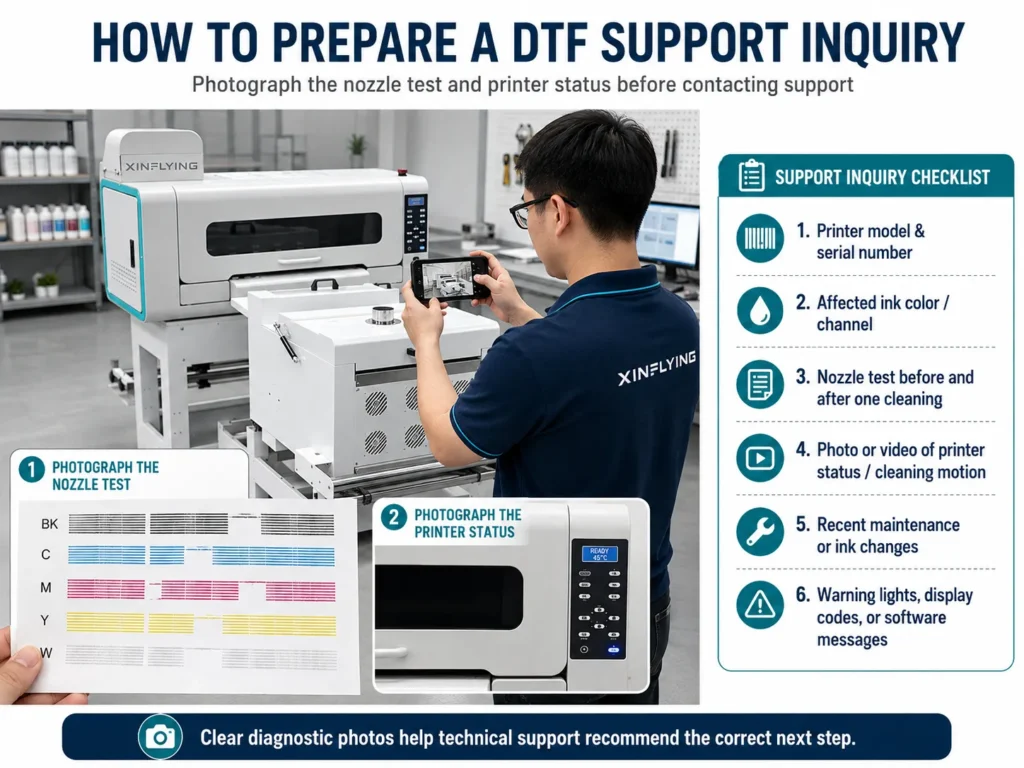
What to Send With a Technical Inquiry
A clear support request can shorten diagnosis. Include:
- the printer model and serial number;
- ink color or channel affected;
- a photo of the nozzle test before and after one cleaning;
- a short video of the capping and pumping motion;
- recent maintenance or ink changes; and
- any lights, display codes, or software messages.
Get Model-Specific DTF Printer Support
XINFLYING offers DTF printer machines and production solutions for different output requirements. If the nozzle test remains incomplete after the safe checks above, submit an inquiry with your model and diagnostic photos so the team can recommend the correct next step.
Sources
- XINFLYING, A2 All-in-One Printer FAQ / A2一体机常见问题处理 (bilingual internal technical document supplied for this article)
- XINFLYING Imprimante DTF
- XINFLYING Support