قم بالترقية عندما يستمر الطلب في تجاوز ما تستطيع متجرك تقديمه من طلبات مقبولة ومُسلَّمة في موعدها، وليس فقط خلال شهر واحد مزدحم. وتتمثل الدلائل المعتادة في قائمة انتظار تتزايد أسبوعًا بعد أسبوع، وساعات عمل إضافية أصبحت روتينية، وطلبات تضطر إلى رفضها أو إرسالها إلى جهات خارجية رغم قدرتك على طباعتها بنفسك.
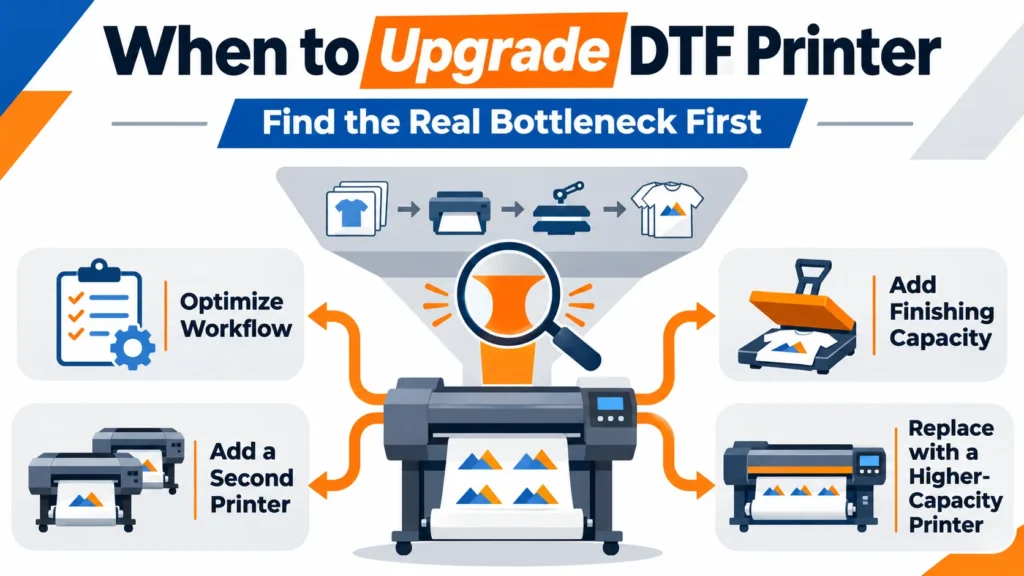
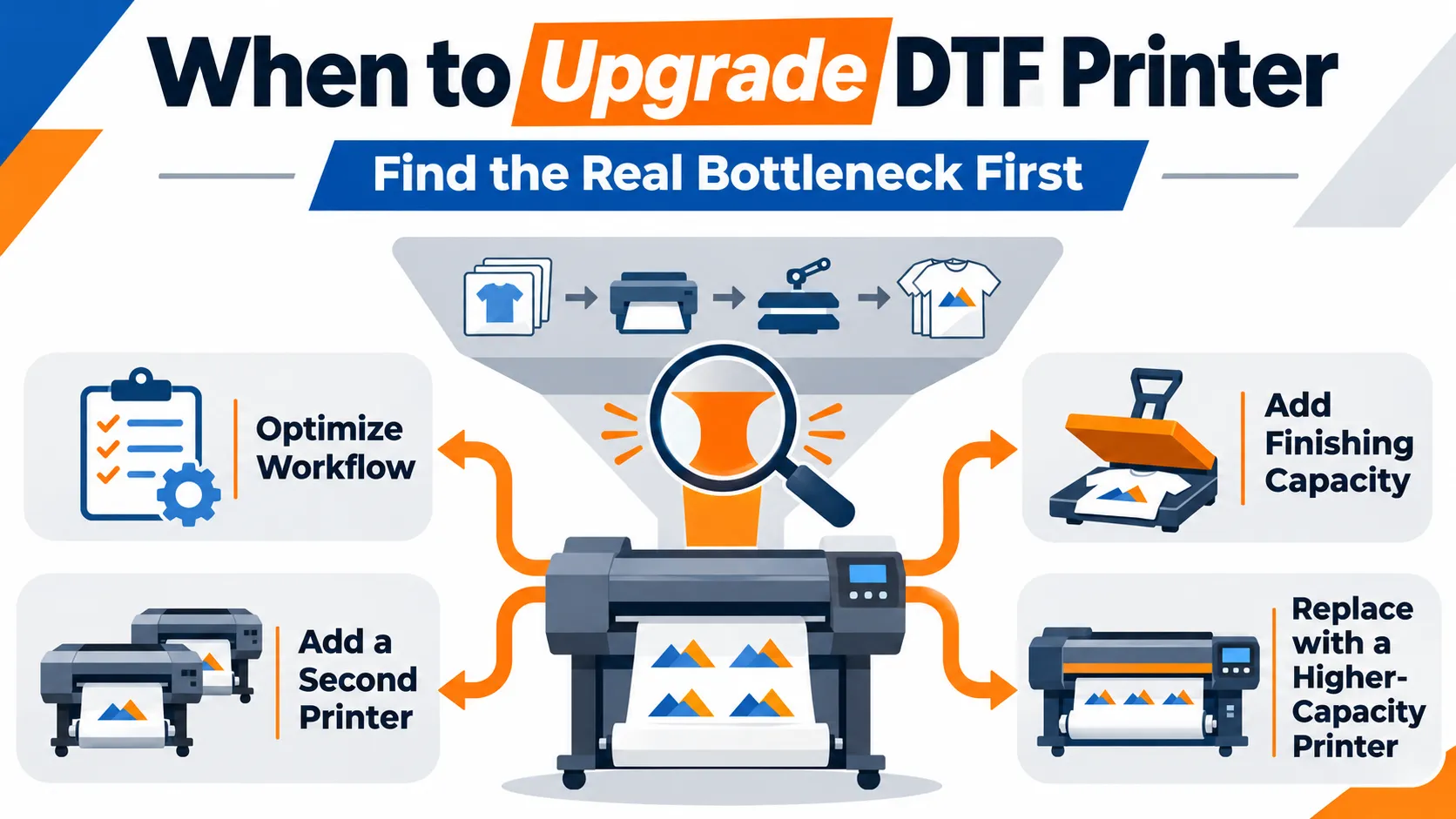
هذا يوضح لك متى للتصرف. إنه لا يخبرك ماذا للشراء. في العديد من المتاجر، لا تُعد الطابعة هي العامل الذي يحد من الإنتاج؛ بل إن العوامل المحددة هي المسحوق وعملية المعالجة، أو الضغط، أو التعبئة. لذا، قد يكون الاستثمار التالي هو تحسين سير العمل، أو زيادة سعة عمليات التشطيب، أو شراء طابعة ثانية، أو استبدال الطابعة الحالية بأخرى ذات سعة أكبر.
هذا الدليل موجه للمتاجر التي تقوم بالفعل بطباعة DTF داخليًّا. وهو يشمل كيفية تحليل المؤشرات، وتحديد المرحلة التي تحد من الإنتاجية، ومقارنة مسارات الترقية الأربعة، وتقييم التكلفة، واختبار المعدات الجديدة وتشغيلها دون التأخر عن المواعيد النهائية. إذا كنت لا تزال مترددًا بشأن إدخال تقنية DTF إلى شركتك من الأساس، فابدأ بمقارنتنا لـ الطباعة الداخلية بتقنية DTF مقابل الاستعانة بمصادر خارجية.
علامات تدل على أن الوقت قد حان لترقية طابعتك التي تعمل بتقنية DTF، وعلامات تدل على أن الوقت لم يحن بعد
لا يوجد عدد محدد من عمليات التحويل يوميًا يُعتبر إشارة إلى “الترقية الآن”.” قد يواجه متجران لهما نفس عدد الطلبات اليومية مشكلات مختلفة تمامًا. فقد يقوم أحدهما بطباعة صور صغيرة على الجانب الأيسر من الصدر موزعة على الفيلم، بينما يقوم الآخر بطباعة صور على كامل الظهر تستغرق وقتًا طويلاً في إنجازها. وتأتي الإشارات المفيدة من جدولك الزمني وسجل طلباتك.
الإشارات التي تشير إلى وجود مشكلة حقيقية في السعة:
- الطابور لا يزال يتزايد. يكون حجم العمل المعلق الذي ينتظر البدء أكبر في نهاية كل أسبوع مقارنة ببدايته، وذلك على مدى عدة أسابيع عادية متتالية.
- العمل الإضافي أمر معتاد. أصبحت ساعات العمل المتأخرة جزءًا من الروتين الأسبوعي العادي، بدلاً من أن تكون مجرد مجهود استثنائي يُبذل من حين لآخر.
- إما أن تتجاهل العمل الذي يمكنك طباعته أو أن تعهد به إلى جهة خارجية. احسب هذه الطلبات. فكل طلب منها يمثل طلبًا لا تستطيع خط إنتاجك تلبيةه في الوقت الحالي.
- مهمة واحدة مستعجلة تفسد الأسبوع بأكمله. عندما لا تتوفر طاقة إنتاجية فائضة، فإن أي طلب عاجل واحد يؤدي إلى تأخير إنجاز جميع الطلبات الأخرى.
- تستنزف عمليات إعادة التصنيع وقت الآلات والعمالة. تستهلك عمليات إعادة الطباعة نفس الطابعة والمسحوق وساعات عمل المشغلين التي تستهلكها الطلبات الجديدة، لذا فإن ارتفاع معدل إعادة الطباعة يؤدي إلى انخفاض السعة الفعلية.
- تؤدي الأعطال إلى عدم الالتزام بالمواعيد النهائية. إن الأعطال المتكررة التي تؤدي إلى توقف الإنتاج تكلفك خسارة الطلبات، وليس مجرد فواتير الإصلاح.
الإشارات التي تشير إلى أن تحديث المعدات قد لا يكون الحل المناسب في الوقت الحالي:
- يأتي هذا الضغط نتيجة لطلبية كبيرة واحدة أو ذروة موسمية واحدة.
- تعود مشاكل الجودة إلى الصيانة أو المواد الاستهلاكية أو الإعدادات، وليس إلى حدود قدرات المعدات.
- غالبًا ما تظل الطابعة في وضع الانتظار بينما تتراكم الطلبات في مراحل رش المسحوق أو الضغط أو التعبئة.
- والسبب الرئيسي هو توفر آلة أكبر حجمًا.
نقص مستمر مقابل ذروة موسمية
قارن بين بضعة أسابيع عادية وأكثر أسابيعك ازدحامًا. إذا كانت قائمة الانتظار تتزايد فقط خلال فترات الذروة وتختفي بعدها، فإن النقص في السعة يعتبر موسميًّا. وقد يكون اللجوء إلى العمل الإضافي، أو الاستعانة بمصادر خارجية مؤقتة، أو طباعة تصميمات جاهزة مسبقًا، حلًّا أقل تكلفة من شراء معدات جديدة.
وإذا زاد طول قائمة الانتظار خلال الأسابيع العادية أيضًا، فإن النقص يكون هيكليًّا. وعندها يصبح من المنطقي التخطيط لإجراء ترقية. كما يُعتبر العملاء الدائمون الذين يقدمون طلبات أكبر، أو الحسابات الجديدة ذات الحجم الثابت، طلبًا هيكليًّا بمجرد تأكيدها.
سجل هذه الأرقام قبل التحدث إلى أي بائع
يبدأ القرار الصائب بشأن الترقية بسجل الطلبات، وليس بورقة المواصفات. يتم قياس السرعة المعلنة للطابعة وفقًا للشروط التي يحددها البائع. ويُظهر سجل الاستخدام الخاص بك المتطلبات الفعلية لطلباتك. احتفظ بهذا السجل لعدة أسابيع عادية، وإن أمكن، لفترة الذروة أيضًا.
| تسجيل كل طلب | لماذا هذا مهم؟ |
|---|---|
| أحجام الأعمال الفنية وعدد التصاميم التي تشترك في دورة طباعة واحدة | يُعيّن عرض الطباعة والتداخل الذي تريده |
| الكمية وتاريخ الاستحقاق | يوضح مقدار السعة الاحتياطية التي تتطلبها الأعمال العاجلة |
| شكل التسليم: قطع قماش منفصلة أو ملابس جاهزة | يحدد المكان الذي يُعتبر فيه الطلب “منفّذًا” فعليًّا” |
| وقت البدء والانتهاء في كل مرحلة | يُظهر الأماكن التي تنتظر فيها المهام |
| إعادة الطباعة والسبب | يكشف عن الطاقة الإنتاجية المفقودة بسبب مشاكل الجودة |
| الطلبات التي تم التعاقد مع طرف خارجي لتنفيذها أو التي تم رفضها، مع ذكر قيمتها | طلبات الشراء التي لا يمكنك تلبيةها اليوم |
| فترة التعطل وأسبابها | يفصل بين قيود المعدات ومشاكل الصيانة |
كما أن هذه السجلات تجعل المحادثات مع موردي المعدات أكثر إنتاجية. فالبائع الذي يطلع على الأبعاد الفعلية لأعمالك الفنية وكمياتها وخطوات إنجازها يمكنه أن يوصيك بتكوين مخصص لأعمالك بدلاً من حزمة عامة.
حدد المرحلة التي تحد من الناتج المقبول
يتم تحديد سعة الإنتاج بناءً على المرحلة الأبطأ التي يجب أن يمر بها كل طلب، وليس بناءً على أسرع آلة في المصنع. عادةً ما تمر طلبية DTF بمراحل إعداد الملف وعملية RIP، ثم الطباعة، وتطبيق المسحوق والمعالجة الحرارية، والقطع أو الفرز، ثم إما التعبئة (بالنسبة للملصقات السائبة) أو الكي، والفحص، والطي، والتعبئة (بالنسبة للملابس الجاهزة).
حدد خط النهاية أولاً. إذا كنت تبيع ملصقات نقل الحرارة، فإن الطلب يُعتبر منجزاً عندما يتم تغليف الملصقات التي تم قبولها. أما إذا كنت تبيع ملابس مزخرفة، فيُعتبر الطلب منجزاً عندما تصبح الملابس المكوية والمفحوصة جاهزة للشحن. ولا فائدة من وجود طابعة تنتج الأفلام بسرعة أكبر إذا كانت القمصان المكوية لا تزال تغادر المصنع بنفس المعدل.
ثم ابحث عن المكان الذي تنتظرك فيه فرص العمل:
| ما تراه | المرحلة التي قد تحد من الإنتاج |
|---|---|
| تُكدَّس الأغشية المطبوعة قبل عملية التغبيش أو المعالجة | تطبيق المسحوق والتصلب |
| تتراكم الملصقات المجففة بجانب مكبس الحرارة | الضغط |
| الملابس المكوية تنتظر الفحص أو الطي أو التعبئة في أكياس | الفحص والتعبئة |
| تكون الطابعة في حالة خمول أثناء قيام المشغلين بإعداد الملفات | تحضير الملفات، أو RIP، أو التجميع |
| تعمل الطابعة طوال اليوم تقريبًا، ولا يبدأ العمل التالي إلا بعد الانتهاء من الطباعة | الطباعة |
| تعود العديد من الطلبات إلى بداية الطابور | مراقبة الجودة وإعادة التصنيع |
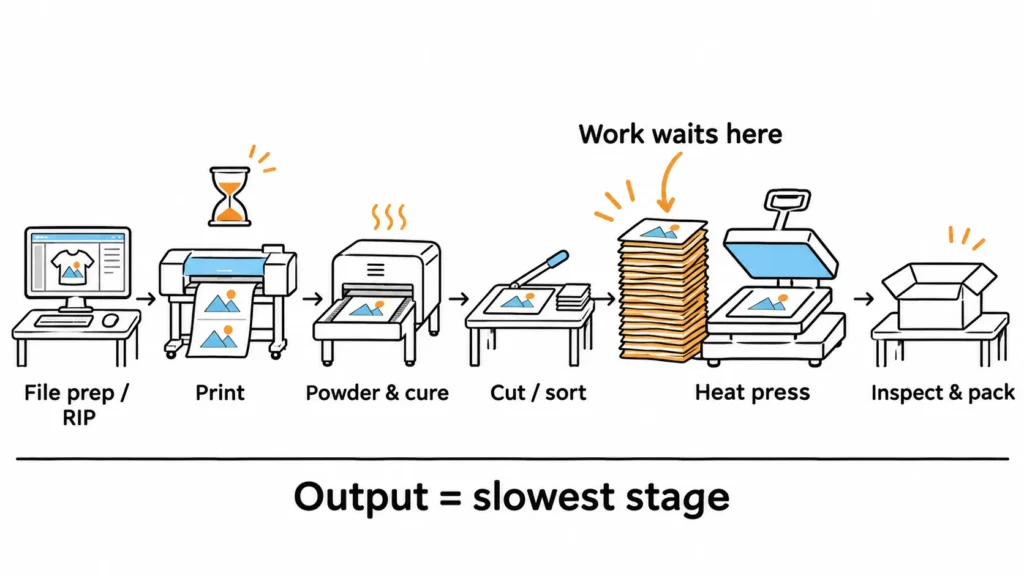
طابور الانتظار هو مؤشر، وليس دليلاً قاطعاً. تأكد من ذلك عن طريق قياس الوقت الذي يستغرقه طلب نموذجي واحد في كل مرحلة. لاحظ المدة التي تستغرقها كل خطوة ومدة انتظار الطلب بين الخطوات. وعادةً ما تكون المرحلة التي يتراكم أمامها أكبر عدد من الطلبات، في حين تظل المراحل التي تليها خاملة، هي نقطة الاختناق.
وتذكر أيضًا أن تؤدي زيادة سعة الطباعة إلى زيادة الحمل على جميع المكونات التي تلي الطابعة. إذا تضاعف إنتاج الأفلام، فسيتعين على عمليات الضغط، والطي، والفرز، والتعبئة، والشحن، ومساحة التخزين المؤقت التعامل مع كمية تبلغ تقريبًا ضعف الكمية الحالية. وقد يؤدي حل أحد معوقات الإنتاج إلى ظهور عدة معوقات جديدة إذا لم تكن بقية خط الإنتاج جاهزة.
مقارنة بين أربع طرق لزيادة السعة
بمجرد معرفة المرحلة التي تحد من الإنتاج، تضيق الخيارات المتاحة. ويناقش الزملاء في هذا المجال هذه الخيارات نفسها؛ ويُدرج الجدول أدناه هذه الخيارات حسب المشكلة التي يعالجها كل منها وكيفية معرفة ما إذا كان قد نجح أم لا.
| مسار الترقية | ما يمكنه إصلاحه | ما الذي لن يعالجه | ما الذي يضيفه ذلك | كيف يمكن معرفة ما إذا كان الأمر قد نجح |
|---|---|---|---|---|
| تحسين السطر الحالي | وقت تعطل الطابعة، وسوء ترتيب المهام، والمناولة الزائدة، وعمليات إعادة الطباعة التي يمكن تجنبها، وفترات التوقف غير المخطط لها لأغراض الصيانة | طابعة تعمل فعليًّا بأقصى طاقتها | الوقت الذي سيستغرقه الموظفون في تنفيذ الإجراءات الجديدة؛ وربما إجراء تغييرات على البرامج أو التصميم | زيادة عدد الطلبات المقبولة أسبوعيًا باستخدام نفس المعدات |
| زيادة الطاقة الإنتاجية في مرحلة التشطيب (آلة هز وتجفيف أوتوماتيكية، أو مكبس حراري آخر أو أسرع) | في انتظار عملية التغليف بالبودرة، أو المعالجة، أو الضغط | سرعة الطباعة | تكلفة المعدات، المساحة الأرضية، الطاقة، تدريب المشغلين | لم يعد العمل يتراكم في تلك المرحلة، وتزداد المخرجات المقبولة |
| إضافة طابعة ثانية | قدرة الطباعة؛ النسخ الاحتياطي الجزئي في حالة توقف إحدى الطابعات | مراحل الإنجاز التي تم ملؤها بالفعل | أعباء عمل أخرى للمشغل، ومخزون الأفلام والحبر، وإجراءات الصيانة الروتينية، والمساحة، وربما جهاز هزاز ثانٍ | ترتفع معدلات الإنتاج المقبولة بشكل إجمالي، وتواكب مراحل التشطيب هذا الارتفاع |
| استبدلها بطابعة ذات سعة أكبر | قدرة الطباعة، فيلم أوسع لتجميع التصاميم، مزيد من الأتمتة | حدود الضغط أو التعبئة؛ عادات صيانة ضعيفة | مساحة أكبر، احتياجات طاقة أعلى، مهارات صيانة أكثر، نقطة فشل واحدة | يزيد حجم الإنتاج المقبول بناءً على طلباتك الخاصة، دون الحاجة إلى إعادة العمل |
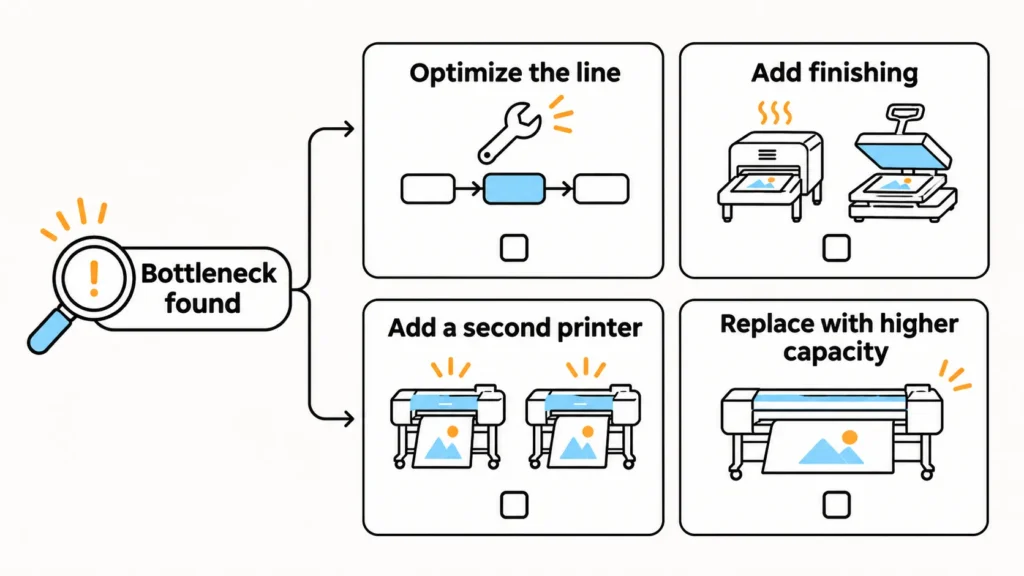
تحسين الخط الحالي
This is usually the cheapest step, so check it first. Better nesting puts more designs on each run, and batching orders by size cuts setup time. Fixing a recurring cause of reprints recovers machine hours, and a stable maintenance routine reduces stops. Reducing how often each garment is picked up, moved, and set down saves labor at every stage.
Add Finishing Capacity
When printed film waits for powder and curing, an automatic shaker and dryer matched to your print width can remove that wait. When transfers wait at the press, another press, or a model better suited to your volume and garment types, adds capacity where it’s needed. Our heat press guide for DTF printing covers press types and settings.
Add a Second Printer
A second printer adds printing capacity and keeps some work moving if one printer is down for maintenance. It also adds another machine to run, clean, and supply. Don’t count on full redundancy, though. Two printers that share one shaker, one RIP computer, one operator, or one power circuit still stop together when that shared item fails.
Replace With a Higher-Capacity Printer
A wider or more automated printer concentrates capacity in one machine and may lower the operator time per transfer. It can also make larger gang sheets practical; see our guide to choosing a طابعة DTF للأوراق المجمعة. The trade-off is dependence. When that one printer stops, all printing stops. Higher-capacity printers often need more consistent daily care, and some don’t tolerate long idle periods well.
Second Printer or One Bigger Printer?
There’s no universal answer. Compare the options on your staffing, space, technical skill, and how much a full stop would cost you.
- A second printer suits shops that value continuity, run varied small orders, or want to keep one machine on a different film or job type. It needs space and staff for two maintenance routines.
- One bigger printer suits shops with steady, high-volume work and an operator who can handle more demanding maintenance. It needs a backup plan, such as spare parts, support response, or a partner who can print during a stop.
Don’t estimate total line output by multiplying printhead count. Printhead configuration affects print speed, but the line’s accepted output still depends on finishing, staffing, and rework. Our comparison of dual-head vs four-head DTF printers explains where extra heads pay off.
Repair or Replace an Older DTF Printer?
Machine age alone doesn’t decide this. A well-maintained printer with high hours can be in better shape than a younger one that has suffered settled white ink, poor capping, and dust in the mechanics. Printheads, dampers, capping parts, pumps, and belts are expected to wear; replacing one doesn’t mean the printer is finished.
Replacement becomes worth serious study when several conditions start to stack up:
- Faults keep appearing in different systems, such as electronics, ink supply, and mechanics, rather than one wear part.
- Downtime is causing missed deadlines or lost customers, not only repair costs.
- Parts or technical support for the model are getting harder to obtain.
- The printer can’t meet a requirement your orders now have, such as print width or white ink coverage.
Compare the expected cost of keeping the printer, including likely repairs, downtime, and lost orders, with the full cost of replacing it. Don’t decide only because a repair quote is close to the printer’s resale value. A repair may still be the cheaper way to keep deliveries reliable, while a cheap repair may not fix an older machine that keeps failing.
Does the Upgrade Pay? Build the Math on Incremental Cash
Count only the money that changes because of the upgrade. On the income side, that means the orders you can realistically win, mainly the work you now decline or outsource. On the cost side, it means everything new: equipment, installation, training time, extra consumables, maintenance parts, added labor, space, and power.
Two cautions keep the math honest. First, revenue is not profit; extra sales still carry material and labor costs. Second, labor hours freed by automation only save cash if you cut paid hours or use those hours to produce more sales. Don’t count the same hours once as wage savings and again as extra orders.
Here is a hypothetical example to show the method. The numbers are illustrations, not prices, results, or a forecast for any equipment.
| Line item (hypothetical) | Full demand captured | Half of demand captured |
|---|---|---|
| Extra transfers sold per month (now declined or outsourced) | 300 | 150 |
| Contribution per transfer: \$9.00 price − \$2.50 materials | \$6.50 | \$6.50 |
| Monthly contribution before added costs | \$1,950 | \$975 |
| Added labor (12 h or 6 h × \$20/h) | −\$240 | −\$120 |
| Added maintenance parts and cleaning supplies | −\$150 | −\$150 |
| Net incremental cash per month | \$1,560 | \$705 |
| Upfront cash: equipment, installation, training downtime (assumed \$15,000) | 15,000 ÷ 1,560 ≈ 9.6 months | 15,000 ÷ 705 ≈ 21.3 months |
The payback period more than doubles when only half the expected demand arrives. Before buying, check how firm the extra orders are. Confirmed repeat orders, current outsourcing spend, and quotes you declined are stronger evidence than general growth hopes. Replace every assumption in the table with your own figures.
Test the New Configuration With Your Own Orders
Nominal speed is not accepted output. Printer speeds are stated under the seller’s own conditions, such as a defined image size, resolution, or print mode. The same printer produces far more small, nested designs per hour than full-size prints. Your line’s real output also depends on curing, pressing, and rework.
Before committing, test the proposed configuration with a representative order. This can be a live demonstration or a recorded or remote demo using your files:
- Use the same artwork files, sizes, and nesting you actually run.
- Use the same type of film, powder, and garments, or document any difference.
- Apply the same quality standard you use for customer orders.
- Carry the test through to your finish line: packed transfers or pressed, inspected garments.
Record the accepted pieces, the number of times an operator had to step in, any reprints, stops and their causes, and how long work waited before finishing. Compare those numbers with the same order on your current line. If you’re comparing several printers, our دليل شراء طابعات DTF lists the technical checks to make during a demo.
Roll Out the Upgrade Without Missing Deadlines
The safest rollout protects orders already promised to customers. Plan it in phases, each with a clear condition for moving on. The table is a planning method, not a fixed timeline; the time each phase takes depends on the equipment, your staff, and your order load.
| Phase | What happens | Move on when |
|---|---|---|
| 1. Site preparation | Confirm floor space, power supply, ventilation, network and RIP computer, and where film and finished work will be staged | The site meets the equipment’s installation requirements |
| 2. Installation and training | Install, set up, and train the operators who will run and maintain it daily | Operators can run, clean, and recover from common stops without help |
| 3. Baseline samples | Print and finish reference jobs using your own files, film, powder, and garments | Samples meet your quality standard and are kept as references |
| 4. Small-batch parallel run | Run selected low-risk orders on the new setup while the existing line handles committed orders | Several runs meet quality and timing targets in a row |
| 5. Scale up | Move more order types to the new setup | Accepted output, rework, and downtime stay within your targets |
| Fallback | If results fall short, move orders back to the existing line or a trusted outsourcing partner | Committed deadlines are protected while the issue is fixed |
Keeping the old printer running during phases 3 to 5 is the simplest protection. After the rollout, decide whether to keep it as a backup, dedicate it to small or special jobs, or retire it. Keep it only if it’s reliable enough to rely on and you can maintain it without straining staff.
For Xinflying equipment, our technical team provides remote installation and setup guidance, basic operation training, and daily maintenance guidance. Response times vary with time zone, product, and the complexity of the issue. Whether on-site help is available depends on the specific order.
Plan for the Maintenance and Staffing a Bigger Line Adds
More capacity means more maintenance, not less. Each added printhead, ink channel, white ink circulation system, shaker, and dryer brings its own daily and weekly tasks. Those tasks need a named person and a fixed time in the schedule. A busy line that skips maintenance tends to lose its new capacity to clogs and stops.
Plan for these before the equipment arrives:
- Operator skills. Who will run the new setup, and who covers when that person is away?
- Daily routines. Nozzle checks, cleaning, and white ink care for every printer on the floor. Our قائمة مراجعة صيانة طابعة DTF lays out daily, weekly, and monthly tasks.
- Idle periods. Printers that sit unused for long stretches can suffer settled white ink and dried nozzles. Follow the model’s shutdown procedure before holidays or slow weeks.
- Spare parts. Decide which wear parts to keep on hand based on your volume, the model, and how quickly parts can arrive.
- Consumables. Larger runs mean a bad batch of film, powder, or ink can ruin more work at once. Test any change of supplies on the full process before using it in production.
الأسئلة الشائعة
تتبع مسار طلب تمثيلي واحد عبر كل مرحلة، ولاحظ أين يتعطل سير العمل. إذا كانت الطابعة تعمل معظم اليوم، بينما تظل المراحل التي تليها في انتظار الأفلام، فمن المرجح أن تكون الطباعة هي العنصر المحدد للسرعة القصوى. وإذا تراكمت الأفلام المطبوعة في مراحل التغليف بالمسحوق أو الضغط أو التعبئة، فقم بتحسين تلك المرحلة أولاً.
لا. يعتمد عدد عمليات النقل على حجم العمل الفني، وترتيب الأعمال، وخطوات التشطيب؛ لذا فإن العدد نفسه قد يعني أموراً مختلفة من ورشة إلى أخرى. أما المؤشرات المستمرة فهي أكثر موثوقية: مثل تزايد قائمة الانتظار، والعمل الإضافي الروتيني، ورفض الأعمال أو إسنادها إلى جهات خارجية، وعدم الالتزام بالمواعيد النهائية.
تضيف الطابعة الثانية سعةً أكبر وبعض الاستمرارية، لكنها تضاعف إجراءات الصيانة الروتينية ولا توفر احتياطيًا إلا إذا لم تكن تشترك مع الطابعة الأولى في أي عنصر أساسي. أما الطابعة الأكبر حجمًا فتركز السعة وقد تقلل من العمالة المطلوبة لكل عملية نقل، لكن توقفها لسبب واحد يؤدي إلى توقف جميع عمليات الطباعة. اختر الطابعة المناسبة بناءً على عدد الموظفين، والمساحة المتاحة، ومهارات الصيانة، ومدى تكلفة التوقف التام عن العمل.
نعم، يمكن ذلك، خاصةً عندما تؤدي عملية التحديث إلى أتمتة عملية تطبيق المسحوق أو المعالجة الحرارية أو معالجة الطبقة الرقيقة. أما إذا كان العائق يكمن في عمليات الضغط أو التعبئة، فإن استخدام طابعة أسرع قد يؤدي بدلاً من ذلك إلى زيادة حجم العمل المتراكم في تلك المراحل. قم بقياس عدد الساعات في كل مرحلة قبل التحديث وبعده.
استمر في تشغيله أثناء عملية النشر حتى تظل الطلبات الملتزم بها محمية. وبعد ذلك، احتفظ به كنظام احتياطي أو لاستخدامه في مهام خاصة فقط، شريطة أن يكون موثوقًا وأن يتوفر لدى فريق العمل الوقت الكافي لصيانته.
لا يوجد عمر افتراضي محدد. يتم استبدال الأجزاء القابلة للتلف بمرور الوقت، وللصيانة تأثير كبير على المدة التي تظل فيها الطابعة قادرة على العمل بكفاءة. قم بالترقية عندما تصبح الطابعة غير قادرة على تلبية طلباتك بشكل موثوق أو فعال من حيث التكلفة، وليس عند بلوغ عمر محدد.
Xinflying DTF Printers to Consider for Your Upgrade
If your records show that printing is the limit, two Xinflying models fit common upgrade paths.
XF-702E suits shops whose regular orders keep growing, shops moving up from a narrower printer, and shops adding a second printer to split work. It prints 24 inches (60 cm) wide with two Epson i3200-A1 printheads, a width that handles standard garment graphics and routine gang sheets.
XF-F808 is built for repeat high-volume orders and wider gang sheets. It has a 31-inch (80 cm) print width and eight Epson i3200-A1 printheads. Consider it once printing is the confirmed bottleneck and your finishing capacity and staff can keep pace with it.
Send your artwork sizes, weekly volume, and current setup through either product page, and we’ll help you test the model on your own files before quoting.
Next Step: Bring Your Order Log to the Equipment Conversation
Start by keeping the order log for a few normal weeks and timing one representative order through every stage. That shows whether the next investment belongs in workflow, finishing, a second printer, or a replacement, and how much capacity you actually need.
When printing or powder handling is the limit, bring that log and your bottleneck findings to the conversation. Request a quote from the XF-702E or XF-F808 page above; quotes are prepared for the selected configuration and delivery terms.